Så rensar du Windows Timeline (aktivitetshistorik)?
Windows Timeline, även kallad aktivitetshistorik, var Microsofts funktion för att bläddra bakåt genom de dokument, webbplatser och appar du nyligen använt, och till och med återuppta dem på en annan enhet om du var inloggad på ett Microsoft-konto. Microsoft har sedan dess tagit bort det visuella Timeline-gränssnittet från nyare Windows-versioner, men den underliggande databasen kan fortfarande finnas kvar, med historiska poster, eller fortsätta samla in aktivitet i bakgrunden.
Den lagras som en SQLite-databas, per användare, i %LOCALAPPDATA%\ConnectedDevicesPlatform\<AccountId>\ActivitiesCache.db.
| Fält | Vad det avslöjar | Behandling av PrivaZer |
|---|---|---|
| Appidentifierare | Vilken app eller webbläsare som användes | Borttaget |
| Aktivitetsbeskrivning | Den riktiga titeln på dokumentet eller webbsidan | Borttaget |
| Innehållsreferens | Den exakta filen eller URL:en som var inblandad | Borttaget |
| Start- & sluttidsstämplar | Exakt när, och hur länge | Borttaget |
| Synkroniseringsåtgärdslogg | Kan bevara aktiviteter du trodde var borttagna | Borttaget |
Det här är skillnaden från alla andra spår på denna webbplats: en Amcache- eller Shimcache-post säger att ett program existerade, en aktivitetshistorikpost kan säga vilket dokument du hade öppet och hur länge. PrivaZer rensar både aktivitetsposterna och den underliggande databasen så att det innehållsspåret inte längre finns kvar på disken.
Inte bara att du använde en app, utan vad du gjorde med den: titeln på ett dokument, titeln och adressen till en webbsida, exakt när du började och slutade. Och även att manuellt ta bort en aktivitet från det gamla Timeline-gränssnittet garanterade inte alltid att den var borta, databasens egen synkroniseringsåtgärdslogg kunde fortfarande ha ett register över att den hade existerat. Det är spåret som är värt att rensa medvetet snarare än att lita på en ta bort-knapp som kanske inte fungerade helt.
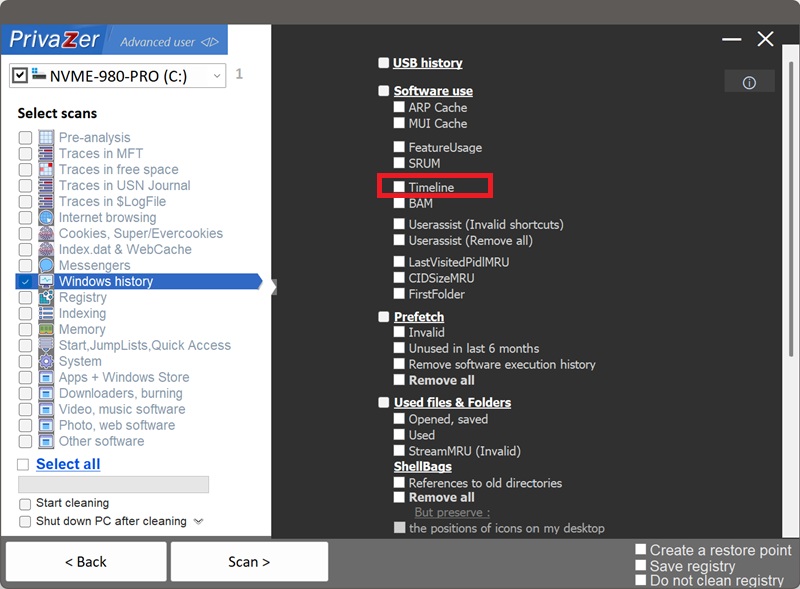
Ja. PrivaZer upptäcker och rensar ActivitiesCache.db som en del av en skanning, och kan även rikta in sig på den separat.
Databasen är per användare, i din egen AppData-mapp, så inga administratörsrättigheter krävs. Den kan hållas öppen av Windows Connected Devices Platform-tjänst medan du är inloggad, PrivaZer tar hänsyn till det så att posterna faktiskt rensas i stället för att lämnas kvar.
Ja. Att stänga ett dokument, stänga en webbläsarflik, eller till och med avinstallera appen du använde tar inte bort dess aktivitetshistorikpost. Titeln, innehållsreferensen och tidsstämplarna kan finnas kvar i databasen på obestämd tid, och beskriva exakt vad du gjorde, långt efter att själva aktiviteten är över. Att rensa den är det som tar bort den kvarlämnade uppgiften.
Ja. Att rensa ActivitiesCache.db påverkar inte dina installerade program, dina faktiska dokument eller filer, eller systemets stabilitet. Den enda synliga effekten är att, på system där aktivitetsspårning eller återupptagande mellan enheter fortfarande är aktivt, du förlorar möjligheten att bläddra bakåt genom senaste aktiviteten tills nya poster samlas igen.
Om aktivitetsspårning fortfarande är aktivt på din Windows-version, ja, nya poster byggs upp när du använder dokument, webbplatser och appar igen, det är förväntat. Om ditt system inte längre samlar in denna data alls, kommer inget att fyllas på igen. Oavsett vilket tar rensning bort det historiska spåret fram till den punkten, så kör PrivaZer regelbundet för att hålla det kort.
Alla dessa visar att programvara användes, men Windows Timeline är den enda som kan visa vad som faktiskt gjordes med den, riktiga dokumenttitlar, webbsidestitlar och URL:er, med start- och sluttidsstämplar. UserAssist, FeatureUsage, Amcache, Shimcache, MUI Cache och SRUM beskriver alla program: att de kördes, hur ofta, hur de användes, vilka resurser de förbrukade. Timeline beskriver innehåll. Att bara rensa en lämnar de andra sex orörda.
För de andra, se: Amcache, Shimcache, UserAssist, SRUM, MUI Cache och FeatureUsage.
Skanningsalternativ - alternativet Timeline