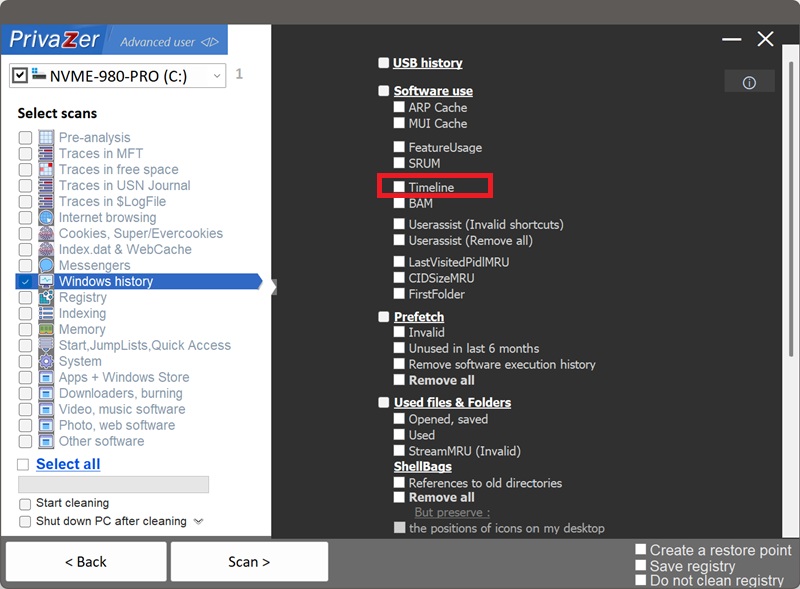
How to Clean Windows Timeline (Activity History)?
Windows Timeline, also called Activity History, was Microsoft's feature for scrolling back through the documents, websites and apps you'd recently used, even resuming them on another device if you were signed into a Microsoft account. Microsoft has since removed the visual Timeline interface from newer Windows versions, but the underlying database can still exist, with historical entries, or continue collecting activity in the background.
It's stored as a SQLite database, per user, at %LOCALAPPDATA%\ConnectedDevicesPlatform\<AccountId>\ActivitiesCache.db.
| Field | What it reveals | Processing by PrivaZer |
|---|---|---|
| App identifier | Which app or browser was used | Removed |
| Activity description | The real title of the document or webpage | Removed |
| Content reference | The exact file or URL involved | Removed |
| Start & end timestamps | Exactly when, and for how long | Removed |
| Sync operation log | Can preserve activities you thought were deleted | Removed |
This is the difference from every other trace on this site: an Amcache or Shimcache entry tells you a program existed, an Activity History entry can tell you what document you had open and for how long. PrivaZer clears both the activity records and the underlying database so that content trail no longer sits on disk.
Not just that you used an app, but what you did with it: the title of a document, the title and address of a webpage, exactly when you started and finished. And even manually removing an activity from the old Timeline interface didn't always guarantee it was gone, the database's own sync operation log could still hold a record of it having existed. That's the trail worth clearing deliberately rather than trusting a delete button that may not have fully worked.
Yes. PrivaZer detects and clears ActivitiesCache.db as part of a scan, and can target it on its own.
The database is per-user, under your own AppData folder, so no administrator rights are required. It can be kept open by Windows' Connected Devices Platform service while you're signed in, PrivaZer accounts for that so the records are actually cleared rather than left in place.
Yes. Closing a document, closing a browser tab, or even uninstalling the app you used does not remove its Activity History entry. The title, the content reference and the timestamps can stay in the database indefinitely, describing exactly what you did, long after the activity itself is over. Cleaning it is what removes that leftover record.
Yes. Clearing ActivitiesCache.db does not affect your installed programs, your actual documents or files, or system stability. The only visible effect is that, on systems where activity tracking or cross-device resume is still active, you lose the ability to scroll back through recent activity until new entries accumulate again.
If activity tracking is still active on your version of Windows, yes, new entries build up as you use documents, websites and apps again, that's expected. If your system no longer collects this data at all, nothing will repopulate. Either way, cleaning removes the historical trail up to that point, so run PrivaZer periodically to keep it short.
All of these show that software was used, but Windows Timeline is the only one that can show what was actually done with it, real document titles, webpage titles and URLs, with start and end timestamps. UserAssist, FeatureUsage, Amcache, Shimcache, MUI Cache and SRUM all describe programs: that they ran, how often, how they were used, what resources they consumed. Timeline describes content. Cleaning only one leaves the other six intact.
For the others, see: Amcache, Shimcache, UserAssist, SRUM, MUI Cache dan FeatureUsage.
Scan options - Timeline option