
Så rensar du UserAssist i Windows?
Det smarta sättet är inte att radera varje post, utan att anpassa rensningen efter vad du faktiskt vill bli av med. I PrivaZers alternativ för Programanvändning, under Userassist, har du två val:
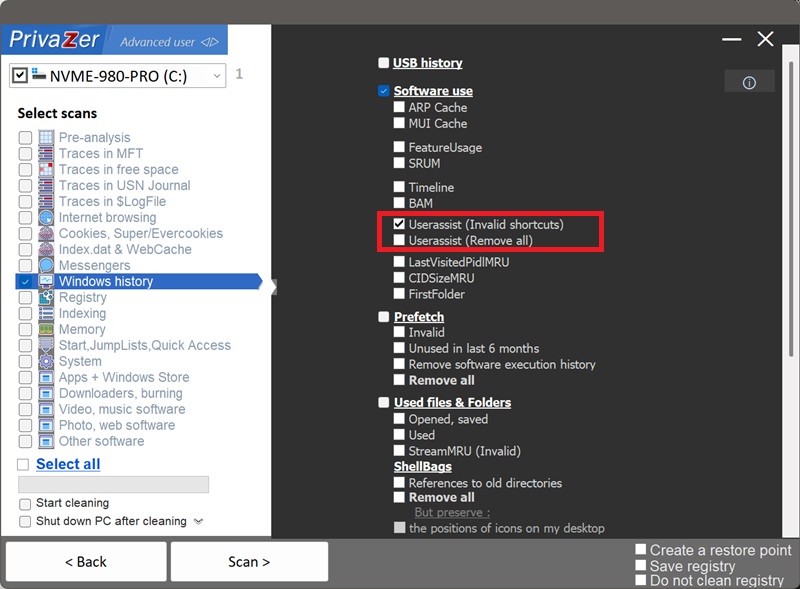
- Userassist (Ogiltiga genvägar), det balanserade standardvalet. Den tar bara bort poster som pekar på ett program, en genväg eller en fil som inte längre finns på din dator, och lämnar starthistoriken för programvara du fortfarande använder orörd, tillsammans med dess bidrag till Start-menyns mest använda-rankning.
- Userassist (Ta bort alla), den fullständiga återställningen. Den raderar hela GUI-starthistoriken, inklusive för närvarande installerad programvara. Windows börjar bygga upp den igen medan du fortsätter använda din dator, och Start-menyns mest använda-lista återställs tills du startar om saker.
Kort sagt: Ogiltiga genvägar raderar det forensiska spåret som spelar störst roll (bevis på programvara som inte ens längre finns på maskinen) utan att störa din nuvarande konfiguration, medan Ta bort alla är den fullständiga raderingen. Det är valet som visas ovan.
UserAssist är en Windows-registerartefakt som loggar program som startats via det grafiska gränssnittet, Start-menyn, skrivbordet, aktivitetsfältet, Utforskaren, men inte program som startats från en kommandorad eller ett skript. Den finns under HKEY_CURRENT_USER\Software\Microsoft\Windows\CurrentVersion\Explorer\UserAssist.
För varje program kan den hålla ett antal körningar, datumet och tiden det senast startades, och på Windows Vista och senare, hur länge och hur ofta dess fönster hade fokus. Det är ett precist, tidsstämplat register över vad du faktiskt öppnade och hur ofta, ett av de tydligaste tecknen på handgriplig användning som Windows sparar. Att rensa det tar bort det spåret.
| Fält | Vad det avslöjar | Behandling av PrivaZer |
|---|---|---|
| Programidentifierare | Vilket program eller vilken genväg som startades | Borttaget |
| Antal körningar | Hur många gånger det öppnades från GUI:t | Borttaget |
| Senaste körtid | När det senast öppnades | Borttaget |
| Fokustid & antal | Hur aktivt fönstret användes | Borttaget |
| Starttyp | Direkt körning av körbar fil kontra genvägsstart | Borttaget |
UserAssist har ingen kosmetisk del som shellbags vyinställningar, varje fält är ett register över vad du öppnade och hur. ROT13-förskjutningen på programnamnet är förvanskning, inte skydd, den är trivial att vända om, och det är exakt vad forensiska verktyg avkodar först. PrivaZer tar bort dessa poster så att användningsspåret inte längre finns kvar i registret.
Ja. PrivaZer upptäcker och rensar UserAssist-poster som en del av en skanning, och kan även rikta in sig på dem separat, med valet Ogiltiga genvägar eller Ta bort alla som beskrivs ovan.
Till skillnad från Amcache.hve eller Shimcache finns UserAssist helt under din användarspecifika hive (HKEY_CURRENT_USER), inte en låst maskinomfattande hive och inte en cache som töms vid avstängning. PrivaZer tar helt enkelt bort de matchande registervärdena, ingen omstart eller cachetömning behövs för att ändringen ska träda i kraft, och inga administratörsrättigheter krävs eftersom det är din egen användarhive.
Ja, och det är exakt vad Ogiltiga genvägar är byggt för att rensa. Att avinstallera ett program tar inte bort dess UserAssist-historik. Antalet körningar, senast använt-datum och fokustid kan finnas kvar, och visa att programmet användes, och hur ofta, även efter att alla spår av själva programmet är borta. En utredare kan tolka det som bevis på vanemässig användning på en maskin där programvaran inte längre finns.
Ja. UserAssist är en cache Windows underhåller för eget bruk och bygger upp automatiskt, den påverkar inte dina installerade program, dina filer eller systemets stabilitet.
Den enda synliga bieffekten gäller Ta bort alla: Windows använder delvis UserAssist-antal för att avgöra vilka appar som visas som mest använda i Start-menyn, så att radera allt återställer den rankningen tills du startar om dina vanliga program. Med Ogiltiga genvägar lämnas poster för programvara du fortfarande använder orörda, så att den rankningen inte störs.
Nya poster visas medan du fortsätter starta program från Start-menyn eller Utforskaren, vilket är normalt, UserAssist är en löpande logg över GUI-aktivitet. Rensning tar bort det historiska spåret fram till den punkten. Kör PrivaZer regelbundet för att hålla det kort.
Alla tre loggar att programvara existerade eller kördes, men de fångar olika saker. UserAssist är specifikt för program som startats via det grafiska gränssnittet, och det är den enda av de tre med antal körningar och fokustid, ett mått på faktisk användning, inte bara närvaro. Amcache är en hive-fil med rika metadata per program, inklusive en SHA-1-hash, oavsett hur programmet startades. Shimcache loggar huvudsakligen sökvägar och senast ändrat-datum för filer Windows har behandlat. Att bara rensa en lämnar de andra två orörda.
För de andra två, se: Så rensar du Amcache i Windows och Så rensar du Shimcache i Windows.
Skanningsalternativ - UserAssist-alternativ