Как очистить кэш ARP в Windows?
ARP (протокол разрешения адресов) — это способ, которым ваш ПК находит физический аппаратный (MAC) адрес устройства, зная только его IP-адрес в локальной сети. Windows хранит ответы в актуальной таблице — кэше ARP, — чтобы не спрашивать заново для каждого пакета. Вы можете сами убедиться в этом в любой момент, открыв командную строку и введя arp -a.
Каждая запись связывает IP-адрес с MAC-адресом устройства, с которым вы действительно обменивались трафиком: вашего маршрутизатора, принтера, другого компьютера, телефона — всего, что находится в том же сегменте сети. В этом и заключается аспект конфиденциальности: в отличие от Amcache или UserAssist, кэш ARP не говорит о том, что вы запускали, — он говорит о том, с какими устройствами вы находились рядом и общались в данной сети. Очистка удаляет этот актуальный снимок.
Недолго, и именно это отличает кэш ARP от других следов, очищаемых PrivaZer. Записи бывают либо динамическими (изучаются автоматически и самостоятельно устаревают в Windows, обычно в течение нескольких минут), либо статическими (настраиваются вручную и сохраняются до удаления). Вся таблица находится только в памяти ядра, управляемая драйвером стека TCP/IP (tcpip.sys), поэтому простая перезагрузка полностью её очищает — она восстанавливается с нуля по мере того, как ваш ПК снова начинает общаться с устройствами.
Связанный ключ реестра, HKLM\SYSTEM\CurrentControlSet\Services\Tcpip\Parameters, управляет только таймерами устаревания кэша и не хранит сами записи. Фактические сопоставления IP-MAC вообще никогда не попадают на диск.
Раз кэш недолговечен и исчезает при перезагрузке, зачем вообще его очищать? Потому что, пока ваш ПК работает, эта таблица представляет собой актуальный, читаемый снимок устройств, с которыми вы недавно связывались в сети. Очистка немедленно стирает этот снимок, вместо того чтобы ждать, пока отдельные записи устареют сами по себе.
| Поле | Что это раскрывает | Обработка PrivaZer |
|---|---|---|
| IP-адрес | С каким устройством в сети был контакт | Удалено |
| MAC-адрес | Физическое устройство за этим IP | Удалено |
| Сетевой интерфейс | Какой адаптер обеспечивал обмен | Удалено |
| Тип записи | Была ли она изучена автоматически или задана вручную | Удалено |
| Состояние | Насколько актуально ещё это сопоставление | Удалено |
В отличие от Amcache или SRUM, здесь нет ничего о программах, хешах или времени ЦП — запись ARP всегда описывает только сетевого соседа. PrivaZer очищает эти записи, чтобы актуальная картина того, с какими устройствами вы общались, не оставалась доступной для чтения любому, у кого есть доступ к вашему ПК.
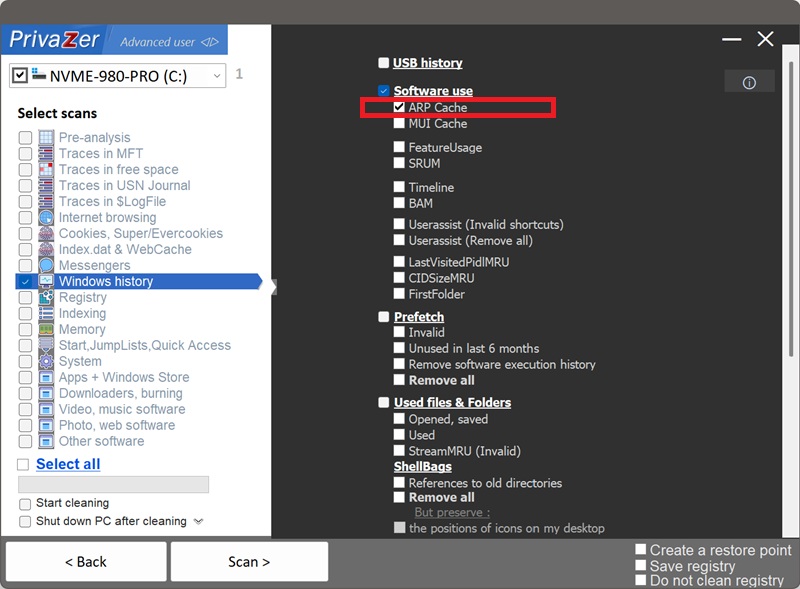
Да. PrivaZer обнаруживает и очищает кэш ARP в рамках сканирования, а также может очищать его отдельно.
Поскольку это актуальная таблица в памяти, а не файл или куст реестра, обходить блокировки не нужно, и ничего не требуется планировать на следующий запуск. PrivaZer сбрасывает записи напрямую через собственный сетевой уровень Windows — с тем же эффектом, что и выполнение arp -d * для каждого активного адаптера. Перезагрузка не требуется.
Да. Очистка не затрагивает ваши файлы, установленные программы или настройки сети. Windows просто заново узнаёт адрес устройства при следующей отправке ему трафика — на практике это один дополнительный запрос, добавляющий незаметную задержку. Ничто в вашем сетевом соединении не нарушается.
Да, часто в течение нескольких секунд, и это ожидаемо. В момент, когда вашему ПК снова нужно связаться с устройством — маршрутизатором, общим принтером, другим компьютером, — он заново узнаёт сопоставление, и появляется новая запись. Кэш ARP — это актуальная рабочая таблица, а не исторический журнал; его очистка даёт вам чистый лист в данный момент, а не постоянное отсутствие записей.
Эти пять артефактов фиксируют, какое ПО выполнялось на вашем ПК, и данные сохраняются на диске неделями. Кэш ARP фиксирует нечто совершенно иное: с какими устройствами в вашей локальной сети вы недавно обменивались трафиком, и существует только в памяти, исчезая в момент перезагрузки. Если вы проводите полную очистку конфиденциальности, очистка кэша ARP дополняет эти артефакты истории программ, а не дублирует их.
Об истории программ см.: Amcache, Shimcache, UserAssist, SRUM и MUI Cache.
Параметры сканирования — опция кэша ARP