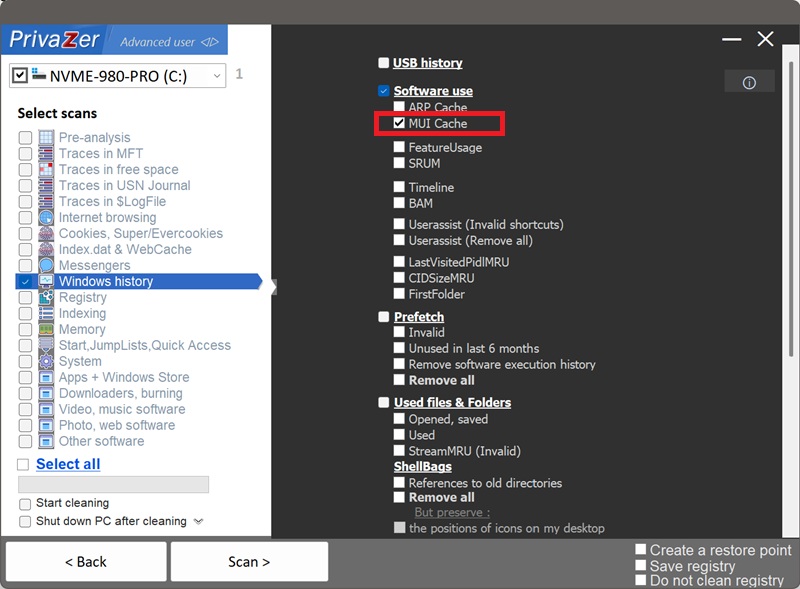
Как очистить MUI Cache в Windows?
MUI Cache (кэш многоязычного пользовательского интерфейса) — это функция Windows, которая хранит настоящее, понятное человеку имя программы, извлечённое из собственной информации о версии исполняемого файла, чтобы проводнику не приходилось заново считывать файл каждый раз, когда нужно его отобразить — в диалоге «Открыть с помощью», свойствах файла или где-либо ещё. Он находится в разделе HKEY_CURRENT_USER\Software\Classes\Local Settings\Software\Microsoft\Windows\Shell\MuiCache.
Как побочный эффект, это становится записью о том, что конкретный исполняемый файл по конкретному пути существовал и был обработан в этой учётной записи, привязанной к его настоящему имени продукта, а не просто к имени файла. Очистка удаляет этот след.
| Поле | Что это раскрывает | Обработка PrivaZer |
|---|---|---|
| Путь к исполняемому файлу | Какой именно файл был задействован | Удалено |
| Понятное имя приложения | Настоящая идентичность программы, из её собственных метаданных | Удалено |
| Языковая ссылка | Как было определено имя | Удалено |
| Время изменения ключа | Примерно когда записи были в последний раз изменены | Удалено |
MUI Cache «легче», чем UserAssist или Amcache: нет счётчика запусков, нет хеша, нет временной метки для каждой записи — только путь в паре с именем. Но именно это имя делает его особенным: оно берётся из собственного ресурса версии исполняемого файла, а не из имени файла, поэтому может раскрыть настоящую идентичность программы, даже если файл был переименован или получил общее название. PrivaZer удаляет эти записи, чтобы этот след идентификации больше не хранился в реестре.
Да. PrivaZer обнаруживает и очищает записи MUI Cache в рамках сканирования, а также может очищать их отдельно.
Как и UserAssist, MUI Cache полностью находится в вашем пользовательском кусте реестра (HKEY_CURRENT_USER), а не в заблокированном общесистемном кусте и не в кэше, очищаемом при завершении работы. PrivaZer просто удаляет соответствующие значения реестра, для вступления изменений в силу не требуется перезагрузка, а права администратора не нужны, поскольку это ваш собственный пользовательский куст.
Да. Удаление программы и её файлов не удаляет её запись MUI Cache. Путь и настоящее имя программы могут сохраниться, показывая, что она существовала и чем на самом деле являлась, даже после того, как все остальные следы самой программы исчезли. Именно очистка MUI Cache удаляет эту оставшуюся запись.
Да. MUI Cache — это удобство отображения, которое Windows поддерживает для себя и автоматически перестраивает. Очистка не влияет на установленные программы, файлы или стабильность системы. Единственный заметный эффект носит косметический характер: в следующий раз, когда проводнику нужно будет показать имя этой программы, например в диалоге «Открыть с помощью», он может ненадолго показать необработанное имя файла, прежде чем заново считать и закэшировать понятное имя.
Да, и это нормально. Каждый раз, когда проводнику снова нужно отобразить понятное имя программы — при её запуске, просмотре свойств, открытии «Открыть с помощью» — оно снова кэшируется. Очистка удаляет накопленный след на данный момент. Запускайте PrivaZer регулярно, чтобы он оставался коротким.
Все пять артефактов показывают, что программное обеспечение существовало на вашем ПК, но каждый фиксирует свой срез данных. MUI Cache — самый «лёгкий» из пяти: нет хеша, нет счётчика запусков, нет временной метки для каждой записи, но это единственный артефакт, который хранит настоящее, понятное человеку имя программы прямо из её собственных метаданных, что может разоблачить переименованный или получивший общее название исполняемый файл. UserAssist фиксирует запуски через GUI со счётчиком запусков и временем в фокусе. Amcache — это файл куста с хешем SHA-1. Shimcache фиксирует пути и даты последнего изменения. SRUM отслеживает почасовое использование ЦП, сети и энергии. Очистка только одного из них оставляет остальные четыре нетронутыми.
Об остальных см.: Amcache, Shimcache, UserAssist и SRUM.
Параметры сканирования — опция MUI Cache