How to Clear ARP Cache on Windows?
ARP, the Address Resolution Protocol, is how your PC finds the physical hardware (MAC) address of a device when it only knows its IP address on the local network. Windows keeps the answers in a live table, the ARP cache, so it doesn't have to ask again for every packet. You can see it yourself any time by opening a Command Prompt and typing arp -a.
Each entry pairs an IP address with the MAC address of a device you've actually exchanged traffic with, your router, a printer, another computer, a phone, anything sharing the same network segment. That's the privacy angle: unlike Amcache or UserAssist, the ARP cache doesn't say what you ran, it says which devices you were near and talking to on a given network. Clearing it removes that live snapshot.
Not long, and that's what makes the ARP cache different from the other traces PrivaZer cleans. Entries are either dynamic (learned automatically, and aged out by Windows on their own, typically within a few minutes) or static (manually configured, and persistent until removed). The whole table lives in kernel memory only, managed by the TCP/IP stack driver (tcpip.sys), so a simple reboot clears it completely, it gets rebuilt from nothing as your PC talks to devices again.
A related registry key, HKLM\SYSTEM\CurrentControlSet\Services\Tcpip\Parameters, only controls the cache's aging timers, it does not store the entries themselves. The actual IP-to-MAC mappings never touch disk at all.
Since it's short-lived and disappears on reboot, why clear it at all? Because while your PC is running, that table is a live, readable snapshot of which devices you've recently reached on the network. Clearing it wipes that snapshot immediately, rather than waiting for individual entries to time out on their own.
| Field | What it reveals | Processing by PrivaZer |
|---|---|---|
| IP address | Which device on the network was contacted | Removed |
| MAC address | The physical device behind that IP | Removed |
| Network interface | Which adapter carried the exchange | Removed |
| Entry type | Whether it was learned automatically or set manually | Removed |
| State | How current the mapping still is | Removed |
Unlike Amcache or SRUM, there's nothing here about programs, hashes or CPU time, an ARP entry only ever describes a network neighbor. PrivaZer clears these entries so the live picture of which devices you've been talking to isn't sitting there for anyone with access to your PC to read out.
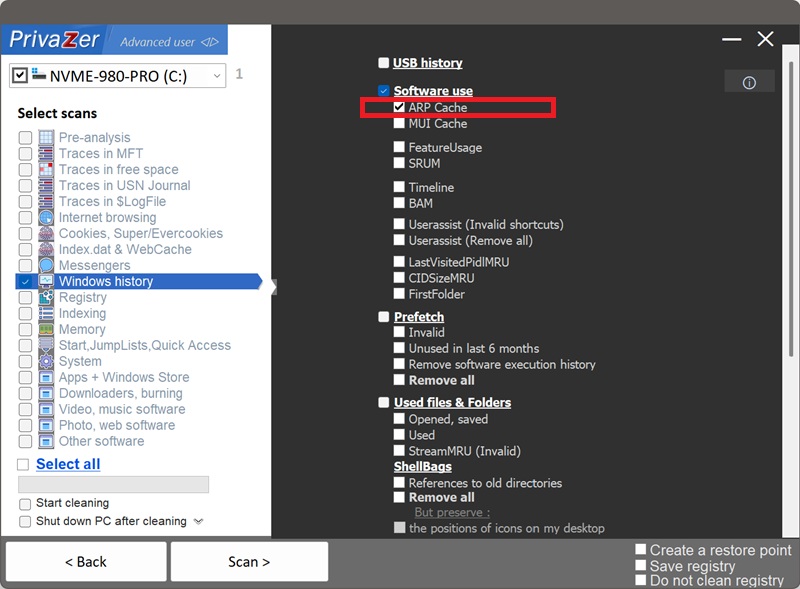
Yes. PrivaZer detects and clears the ARP cache as part of a scan, and can target it on its own.
Because it's a live, in-memory table rather than a file or a registry hive, there's no lock to work around and nothing to schedule for the next startup. PrivaZer flushes the entries directly through Windows' own networking layer, the same effect as running arp -d * for every active adapter. No reboot is required.
Yes. Clearing it doesn't touch your files, your installed programs or your network configuration. Windows simply re-learns the address of a device the next time you send it traffic, in practice a single extra request that adds an imperceptible delay. Nothing about your network connection is disrupted.
Yes, often within seconds, and that's expected. The moment your PC needs to reach a device again, your router, a shared printer, another computer, it re-learns the mapping and a fresh entry appears. The ARP cache is a live working table, not a historical log, clearing it gives you a clean slate at that moment, not a permanent absence of entries.
Those five record what software ran on your PC, and the data persists on disk for weeks. The ARP cache records something else entirely: which devices on your local network you've recently exchanged traffic with, and it exists only in memory, gone the moment you reboot. If you're doing a full privacy pass, clearing the ARP cache complements those program-history artifacts rather than duplicating them.
For the program-history side, see: Amcache, Shimcache, UserAssist, SRUM और MUI Cache.
Scan options - ARP Cache option