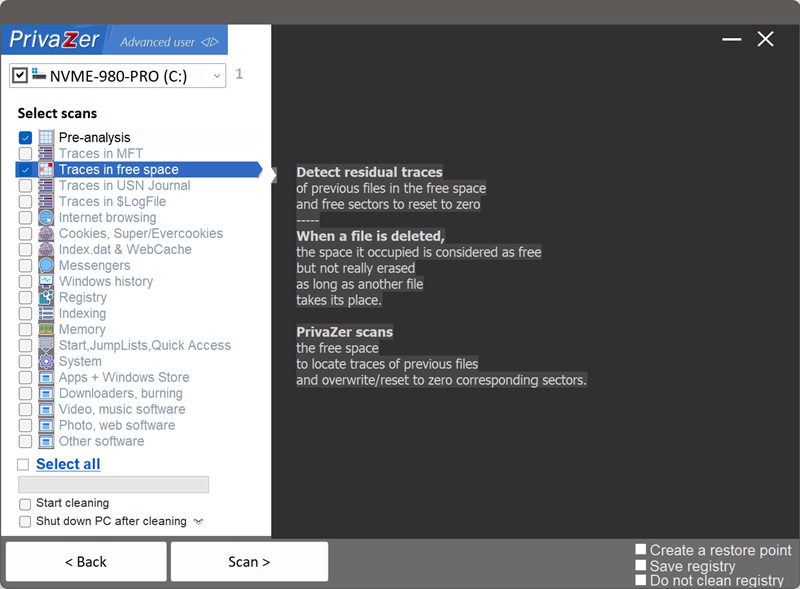
How Free Space Cleanup Works on Windows?
When you delete a file, even bypassing the Recycle Bin, Windows doesn't actually erase the data. It simply marks the space that file occupied on disk as "free", available to be reused. The actual content, the bytes that made up your document, photo or browser cache, stays physically on the drive, fully intact and recoverable with widely available undelete tools, until another file eventually happens to overwrite that same space. That can take a long time. It can also never happen at all.
PrivaZer's scan shows this happening live: as it works through free sectors one by one, it can display an actual example of what it just found, often a fragment of old cached web content, a bit of leftover code, a piece of a document, right before that sector gets overwritten.
Anything that was ever saved to that part of the disk: documents, photos, browser cache files, temporary files, anything at all. The type of file doesn't matter, once its space is marked free, the raw content sits there the same way regardless of what it originally was, until something overwrites it.
Not quite. Modern SSDs support a command called TRIM, which lets the drive know which blocks are no longer in use so its own controller can erase them proactively, ahead of time, for performance reasons. PrivaZer detects and reports whether TRIM is active on your drive as part of its disk analysis.
On a drive with TRIM enabled, a good portion of freed space may already have been erased by the SSD itself before PrivaZer even scans it, meaning fewer residual traces to find. On drives without TRIM, or on traditional hard drives, deleted data can persist indefinitely until something happens to overwrite it, which is exactly the gap free space cleanup is meant to close.
It depends heavily on how much free space your drive has, since every free sector needs to be examined. On an 836 GB drive with 409 GB free, for example, that can mean scanning close to 858 million individual free sectors, which naturally takes real time, longer than clearing a single registry key or cache file. PrivaZer shows live progress throughout, and offers a "low priority" mode so the scan runs in the background without getting in the way of anything else you're doing.
Yes. It only ever touches sectors already marked as unused by the filesystem, never active files, so there's no risk to your data. The main practical consideration is time and, on a mechanical hard drive, some wear from the sustained read and overwrite activity, which is normal for this kind of thorough cleanup.
Every other page on this site describes removing a reference: a registry entry, a cache database record, a log entry that names or describes a file. Free space cleanup operates one level below all of that, at the raw physical layer where the file's actual content can still exist even after every reference to it, in RecentDocs, shellbags, the USN Journal, or anywhere else, has been cleared. It's the layer that makes the rest of this site's cleanup genuinely complete.
Select scans - Traces in free space