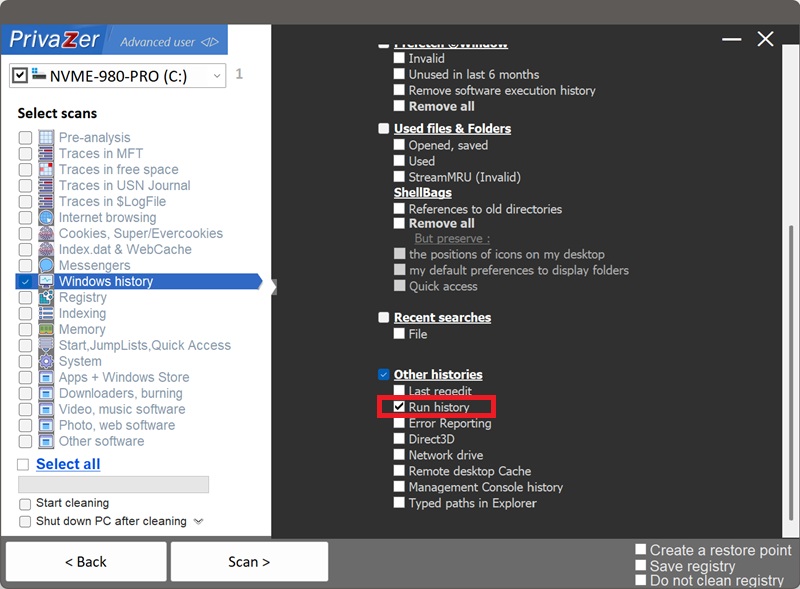
How to Clear Your Run Dialog History (RunMRU)?
The Run dialog (Win+R) lets you launch programs, open files and folders, or connect to network locations by typing a command directly. Every command you've run is kept in a dropdown list, backed by the RunMRU registry key at HKEY_CURRENT_USER\Software\Microsoft\Windows\CurrentVersion\Explorer\RunMRU, saved separately for each Windows user.
| Field | What it reveals | Processing by PrivaZer |
|---|---|---|
| Letter slot | A position in the list, not identifying on its own | Removed |
| Command text | Exactly what was typed and run | Removed |
| MRUList | Which command is most recent | Removed |
RunMRU is one of the older-style Windows MRU implementations: letter-keyed values and a plain MRUList string, rather than the numbered slots and binary MRUListEx used by WordWheelQuery or CIDSizeMRU. That also means the data is stored as readable text with no decoding required, anyone browsing the registry can read a RunMRU entry directly. PrivaZer removes both the command values and the MRUList so nothing about that history remains.
Yes. PrivaZer detects and clears all the values under RunMRU as part of a scan, and can target it on its own, this covers every remembered command along with the MRUList value in one pass. Like most Explorer-related traces, this lives entirely under your per-user hive (HKEY_CURRENT_USER), no administrator rights are required, and no reboot is needed.
Yes. Running the command doesn't clear it from the history, quite the opposite, that's when it gets added. It stays in the dropdown, and in the registry, until it's cycled out by newer commands or removed by cleaning.
Yes. Clearing it doesn't affect your files, your installed programs or system stability. The only visible effect is that the Run dialog's dropdown starts empty again, you'll need to retype commands you want to use, or they'll build back up as you use Run again.
Yes, the next command you run through Win+R gets added right back. That's expected, ongoing behavior for a convenience feature. Run PrivaZer periodically to keep the list short.
Its closest sibling is WordWheelQuery, both store free text rather than structured file or folder data. The difference is intent: WordWheelQuery records what you searched for, RunMRU records what you actually executed, often specific tools, paths or network locations. Windows also keeps other, separate MRU lists for other apps, Microsoft Office keeps its own recent-file history, for instance, RunMRU only covers the Win+R dialog.
Scan options - Other histories - Run history