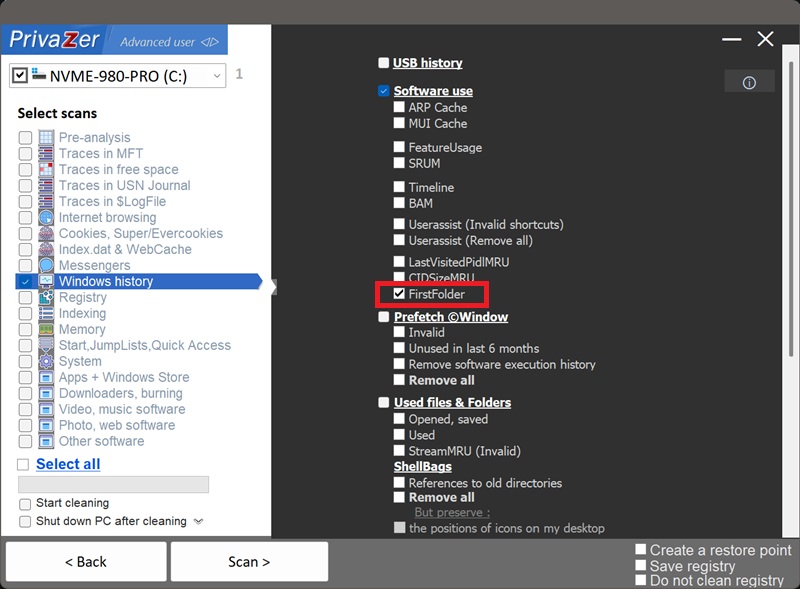
How to Clean the First Folder Shown in Open/Save Dialogs (FirstFolder)?
FirstFolder is the fourth member of the ComDlg32 family on this site, alongside LastVisitedPidlMRU and CIDSizeMRU, under HKEY_CURRENT_USER\Software\Microsoft\Windows\CurrentVersion\Explorer\ComDlg32\FirstFolder.
Its goal is to track, per application, the first folder presented to the user during an Open or Save As operation. Unlike LastVisitedPidlMRU, which is refreshed every time, FirstFolder is set once and holds both the folder path and the path of the binary it applies to, letting anyone reading the registry identify recently used apps and the file locations tied to them, even from an offline NTUSER.DAT copy of the hive.
Either way, PrivaZer clears it as part of the same ComDlg32 cleanup that handles its siblings.
| Field | What it reveals | Processing by PrivaZer |
|---|---|---|
| Application binary path | The full executable path this baseline belongs to | Removed |
| First-visited folder | Where that app's dialog first pointed, potentially years ago | Removed |
Because it isn't refreshed on every use, unlike LastVisitedPidlMRU, a FirstFolder entry can quietly outlive several reinstalls, folder reorganizations or drive replacements, still pointing at whatever location was in play the first time you used a given app's dialog. PrivaZer removes it so that early reference point doesn't linger indefinitely.
Yes. PrivaZer detects and removes the values under ComDlg32\FirstFolder as part of a scan, and can target them on their own.
Like its ComDlg32 siblings, this lives entirely under your per-user hive (HKEY_CURRENT_USER). PrivaZer deletes the values directly, no lock to work around, no reboot needed, and no administrator rights required since it's your own user hive.
Yes, and likely for longer than most traces on this site. Because it's set once and then left alone, uninstalling the application or removing the folder it points to doesn't touch the entry, it can sit in the registry for as long as the value exists, regardless of whether anything it references still does. Cleaning FirstFolder is what removes that leftover.
Yes. Clearing it doesn't affect your installed programs, your files or system stability. The only side effect is conceptual: the next folder that application's dialog visits becomes its new "first" reference point going forward, which has no practical impact on how you use the dialog.
Yes, the next time an application uses the common Open/Save dialog, a fresh baseline entry is set for it. That's expected. Run PrivaZer periodically if you'd rather these anchors not accumulate again.
All three live under ComDlg32 and name an application, but they capture different moments. LastVisitedPidlMRU constantly updates to the most recent folder an app's dialog visited. CIDSizeMRU keeps a ranked MRU list of identifying strings across recent dialog uses. FirstFolder is set once, the earliest folder an app's dialog pointed to, and then left untouched. If LastVisitedPidlMRU shows where you've been lately, FirstFolder can show where things started.
See also: LastVisitedPidlMRU and CIDSizeMRU.
Scan options - first-visited folder (FirstFolder)