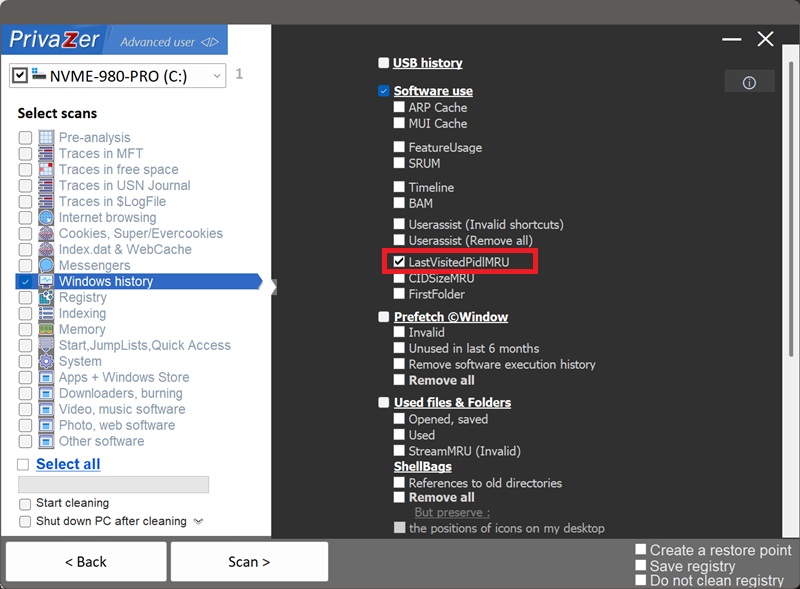
如何清除打开/保存对话框中最近使用的文件(LastVisitedPidlMRU)?
每次您使用标准的Windows“打开”或“另存为”对话框时,Windows都会针对该特定应用程序记住您在其中最后浏览到的文件夹。这一配对——该应用程序、该文件夹——会根据应用程序使用的对话框技术,存储在两个注册表项之一中:
- HKCU\Software\Microsoft\Windows\CurrentVersion\Explorer\ComDlg32\LastVisitedPidlMRU 适用于使用现代通用文件对话框的应用程序。
- HKCU\Software\Microsoft\Windows\CurrentVersion\Explorer\ComDlg32\LastVisitedPidlMRULegacy 适用于仍使用较旧对话框API的应用程序。
它与以下内容是近亲: shellbags, 两者都以PIDL(shell ID列表)的形式存储文件夹位置,即使该文件夹、驱动器或网络共享被断开连接,这一记录也能保留下来。不同之处在于,LastVisitedPidlMRU会明确记录所涉及的具体应用程序,将特定程序与特定文件夹绑定在一起,而这一点是shellbags本身无法做到的。
| 字段 | 揭示的信息 | PrivaZer的处理方式 |
|---|---|---|
| 应用程序名称 | 涉及的是哪个程序 | 已删除 |
| 文件类型筛选器 | 当时正在打开或保存哪种类型的文件 | 已删除 |
| 最后访问的文件夹 | 该应用程序确切指向的位置 | 已删除 |
| MRU顺序 | 该配对最近一次使用的时间 | 已删除 |
| 对话框API分支 | 该条目保存在两个键中的哪一个 | 已删除 |
这两个键的工作方式相同,PrivaZer会同时清除LastVisitedPidlMRU和LastVisitedPidlMRULegacy中的条目,因此无论程序使用哪种对话框技术,应用程序与文件夹的配对都不会再留存于注册表中。
真正重要的是这种组合:不仅仅是您使用过某个应用程序,也不仅仅是浏览过某个文件夹,而是这个特定应用程序曾指向这个特定文件夹。由于该文件夹是以PIDL而非普通路径的形式存储的,即使是一个已不再连接的USB驱动器、网络共享或加密卷,该条目也能引用它,并仍然记录下最后用于在那里打开或保存文件的应用程序。
会。PrivaZer会检测并清除以下两者中的条目: LastVisitedPidlMRU 和 LastVisitedPidlMRULegacy 作为扫描的一部分,也可以单独针对它们进行清理。
与UserAssist、MUI缓存和FeatureUsage一样,它完全位于您的用户配置单元(HKEY_CURRENT_USER)下,而不是一个被锁定的全机器配置单元,也不是关机时才刷新的缓存。PrivaZer只需删除匹配的注册表值即可生效,无需重启,也无需管理员权限,因为这是您自己的用户配置单元。
会,无论哪种情况都会保留。卸载应用程序不会删除其条目,删除该文件夹或断开其指向的驱动器/网络共享也同样不会删除它。这一配对可能会无限期地留存于注册表中,准确记录了哪个应用程序曾与一个可能在您电脑上已不复存在的位置相关联。清理LastVisitedPidlMRU正是为了清除这些残留记录。
安全。清除它不会影响您已安装的程序、文件或系统稳定性。唯一可见的影响只是外观上的:下次您打开该应用程序的打开或保存对话框时,它会从默认文件夹开始,而不是您上次停留的位置,直到再次使用为止。
会,这是正常现象。下次您使用某应用程序的打开或保存对话框并浏览到某个文件夹时,系统会记录一个全新的条目。清理只是删除了此前的历史痕迹。定期运行PrivaZer可以让这份记录保持简短。
Shellbags会记录资源管理器本身浏览过的每一个文件夹,而不论涉及哪个应用程序。LastVisitedPidlMRU范围更窄,但更具体:它只涵盖打开/保存对话框,而且与shellbags不同,它会明确记录具体的应用程序。Amcache、Shimcache、UserAssist、SRUM、MUI缓存、FeatureUsage和Windows时间线都描述了某个程序是如何被使用的,但它们都不会告诉您打开或保存文件时该程序指向了哪个文件夹。LastVisitedPidlMRU正处于这一交集之处:一个应用程序,加一个位置。
另请参见: shellbags, Amcache, Shimcache, UserAssist, SRUM, MUI缓存, FeatureUsage 和 Windows时间线.
扫描选项 - 打开/保存对话框中最近使用的文件