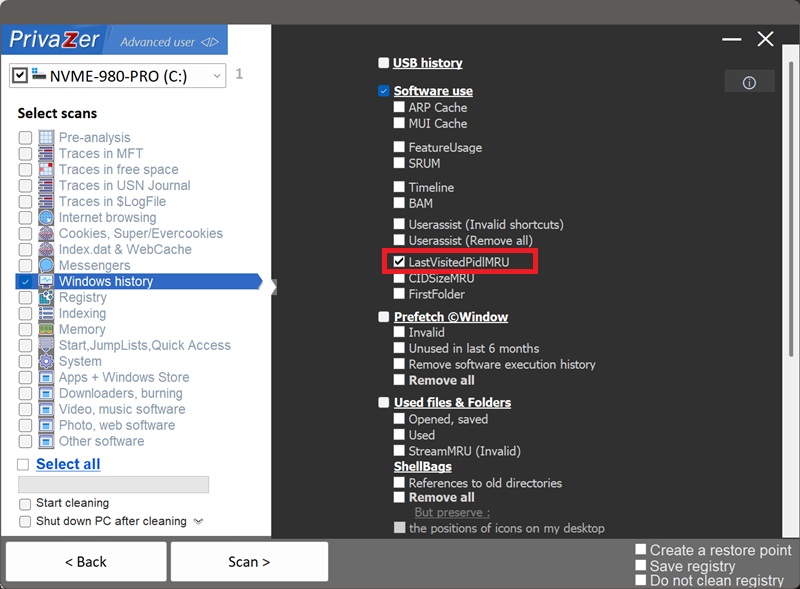
Korleis reinse nyleg brukte filer i Opne/Lagre-dialogar (LastVisitedPidlMRU)?
Kvar gong du brukar ein standard Windows "Opne"- eller "Lagre som"-dialog, hugsar Windows, for det spesifikke programmet, kva mappe du sist navigerte til inni han. Denne koplinga, dette programmet, den mappa, vert lagra under to registernøklar avhengig av kva dialogteknologi programmet brukar:
- HKCU\Software\Microsoft\Windows\CurrentVersion\Explorer\ComDlg32\LastVisitedPidlMRU for program som brukar den moderne felles fildialogen.
- HKCU\Software\Microsoft\Windows\CurrentVersion\Explorer\ComDlg32\LastVisitedPidlMRULegacy for program som framleis brukar det eldre dialog-API-et.
Det er ein nær slektning av shellbags, begge lagrar ei mappeplassering som ein PIDL (ei skal-ID-liste) som kan overleve at mappa, stasjonen eller nettverksdelinga vert kopla frå. Skilnaden er at LastVisitedPidlMRU namngjev det nøyaktige programmet som var involvert, og koplar eit bestemt program til ei bestemt mappe, noko shellbags åleine ikkje gjer.
| Felt | Kva det avslører | Handsaming av PrivaZer |
|---|---|---|
| Programnamn | Kva program som var involvert | Fjerna |
| Filtypefilter | Kva slags fil det opna eller lagra | Fjerna |
| Sist besøkte mappe | Nøyaktig kor programmet peikte | Fjerna |
| MRU-rekkjefølgje | Kor nyleg denne koplinga vart brukt | Fjerna |
| Dialog-API-gren | Kva for éin av dei to nøklane som held oppføringa | Fjerna |
Begge nøklane fungerer på same måte, PrivaZer reinsar oppføringar frå både LastVisitedPidlMRU og LastVisitedPidlMRULegacy, slik at koplinga mellom program og mappe ikkje lenger ligg i registeret, uansett kva dialogteknologi programmet brukte.
Det er kombinasjonen som har noko å seie: ikkje berre at du brukte eit program, og ikkje berre at ei mappe vart bladd gjennom, men at nettopp dette programmet peikte på nettopp denne mappa. Fordi mappa vert lagra som ein PIDL heller enn ein enkel sti, kan oppføringa vise til ein USB-stasjon, ei nettverksdeling, eller eit kryptert volum som ikkje lenger er tilkopla, og framleis namngje programmet som sist vart brukt til å opne eller lagre filer der.
Ja. PrivaZer oppdagar og reinsar oppføringar frå begge LastVisitedPidlMRU og LastVisitedPidlMRULegacy som ein del av eit søk, og kan òg målrette dei åleine.
Som UserAssist, MUI Cache og FeatureUsage held denne heilt til under din eigen brukarhive (HKEY_CURRENT_USER), ikkje ein låst maskinomfattande hive og ikkje ein cache som vert tømt ved avslutting. PrivaZer fjernar rett og slett dei tilhøyrande registerverdiane, ingen omstart er nødvendig for at endringa skal ta til å gjelde, og ingen administratorrettar er påkravde sidan det er din eigen brukarhive.
Ja, uansett kva. Å avinstallere programmet fjernar ikkje oppføringa hans, og å slette mappa, eller kople frå stasjonen eller nettverksdelinga han peikar til, fjernar han heller ikkje. Koplinga kan liggje i registeret i det uendelege, og skildre nøyaktig kva program som vart brukt med ei plassering som kanskje ikkje lenger finst nokon stad på PC-en din. Å reinse LastVisitedPidlMRU er det som fjernar denne attverande oppføringa.
Ja. Å reinse han påverkar ikkje dei installerte programma, filene dine eller systemstabiliteten. Den einaste synlege effekten er kosmetisk: neste gong du opnar Opne- eller Lagre-dialogen til det programmet, startar han frå standardmappa i staden for der du slutta, heilt til han vert brukt igjen.
Ja, og det er normalt. Neste gong du brukar Opne- eller Lagre-dialogen til eit program og navigerer til ei mappe, vert ei ny oppføring registrert. Reinsing fjernar det historiske sporet fram til det punktet. Køyr PrivaZer med jamne mellomrom for å halde det kort.
Shellbags registrerer kvar mappe Explorer sjølv har bladd gjennom, uavhengig av kva program som var involvert. LastVisitedPidlMRU er smalare, men meir spesifikk: han dekkjer berre Opne/Lagre-dialogar, og i motsetnad til shellbags namngjev han det nøyaktige programmet. Amcache, Shimcache, UserAssist, SRUM, MUI Cache, FeatureUsage og Windows Timeline skildrar alle korleis eit program vart brukt, men ingen av dei fortel deg kva mappe det peikte til ved opning eller lagring av filer. LastVisitedPidlMRU sit i skjeringspunktet: eit program, og ein stad.
Sjå òg: Shellbags, Amcache, Shimcache, UserAssist, SRUM, MUI Cache, FeatureUsage og Windows Timeline.
Skannealternativ - nyleg brukte filer i Opne/Lagre-dialogar