Korleis reinse shellbags på Windows?
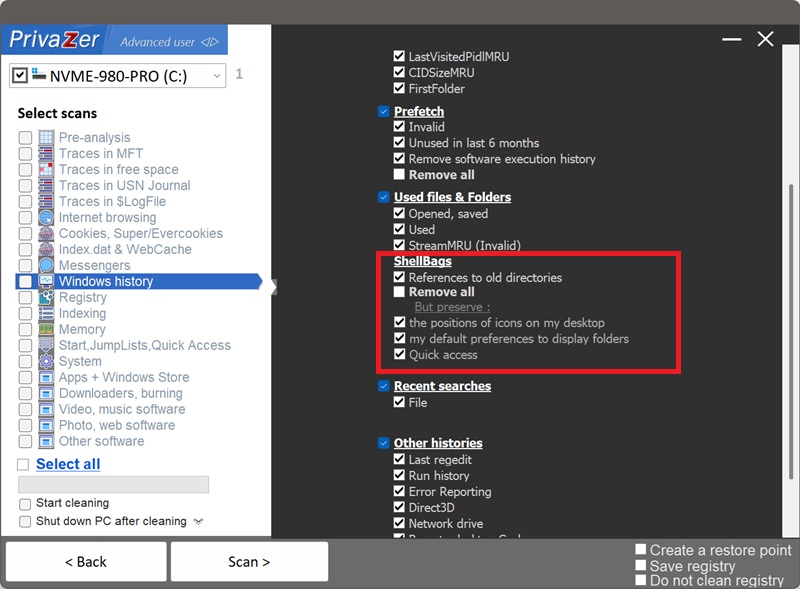
Den smarte tilnærminga er ikkje å slette kvar einaste shellbag, men å tilpasse reinsinga til det du faktisk vil ha borte. I Shellbags-alternativa til PrivaZer har du tre val:
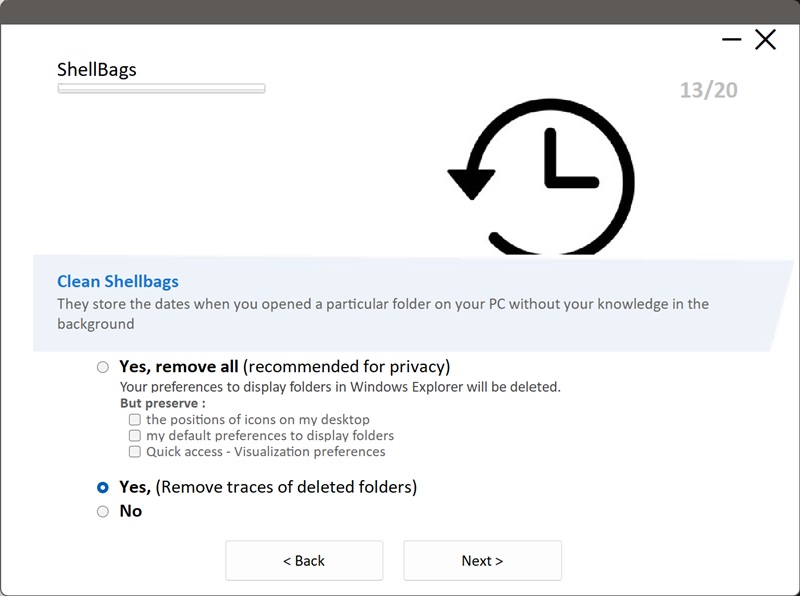
- Ja, fjern alt (tilrådd for personvern), reinsar heile mappenavigasjonssporet. Visingsinnstillingane dine i Explorer vert nullstilte til standard. Bruk avkryssingsboksane Men behald for å halde på ikonposisjonane på skrivebordet, standard mappevisingar, og visingsinnstillingane for Snartilgang.
- Ja, fjern spor etter sletta mapper, det balanserte standardvalet. Det fjernar berre shellbag-oppføringane som peikar til mapper, stasjonar, nettverksdelingar eller krypterte volum som ikkje lenger finst, og let visingsinnstillingane for mappene du framleis brukar, vere urørte.
- Nei, hoppar heilt over shellbags-reinsing. Ingenting vert fjerna.
Kort sagt: Fjern spor etter sletta mapper slettar det rettstekniske sporet som har mest å seie (borte stasjonar og mapper) utan nokon endring i den daglege Explorer-bruken din, medan Fjern alt er den fullstendige nullstillinga. Det er balansen vist ovanfor.
| Registerdel | Datatype | Handsaming av PrivaZer |
|---|---|---|
| MRUListEx | Rekkjefølgje etter nylegheit for opna mapper | Fjerna (personvernspor) |
| ShellItem-type & mål | Identifikator for mappe / stasjon / nettverk / ZIP | Fjerna (personvernspor) |
| Mappenamn & sti | Langt namn + 8.3 kortnamn | Fjerna (personvernspor) |
| Tidsstempel & MFT-referanse | Datoar for oppretta / endra / opna, NTFS-oppføringsnummer | Fjerna (personvernspor) |
| NodeSlot & visingsmodus | Mal for ikon / liste / detaljar | Halden eller nullstilt etter val |
| Ikonposisjonar, sortering & kolonnar | Oppsett inni vindauget | Halden eller nullstilt etter val |
| Vindaugsstorleik & posisjon | Geometri for Explorer-vindauget | Halden eller nullstilt etter val |
Ein shellbag er ikkje éin enkelt verdi, det er to lenkja strukturar. Dei fire ambafarga delane utgjer BagMRU-treet: dei registrerer kva mapper du opna, på kva stasjon eller deling, og når, komplett med NTFS-referansen til mappa. Det er det som gjer shellbags til eit favorittelement for rettsteknikarar, dei overlever mappa, USB-pinnen eller det krypterte volumet dei peikar til. Dei grå delane er Bags-nøkkelen: reint kosmetiske visingsinnstillingar. PrivaZer fjernar BagMRU-sporet og let Bags-visingsinnstillingane vere intakte, eller nullstiller dei berre om du ber om det.
Ja, men det er ditt val. Med Fjern spor etter sletta mapper vert oppføringar for mapper som framleis finst, ikkje rørte, så visingsinnstillingane deira held fram. Med Fjern alt vert alt reinsa, inkludert noverande mapper; Windows byggjer så opp nye shellbags med standardvisingar etter kvart som du bladar. Uansett kva vert ingenting ved filene dine påverka, shellbags lagrar berre visingsinnstillingar og navigasjonshistorikk.
Ikkje visingsinnstillingane, men det som vert registrert saman med dei. Kvar mappe du opnar i Explorer, let etter seg ei BagMRU-oppføring som held på stien til mappa, typen hennar (lokal, flyttbar, nettverk, kryptert), innebygde datoar for oppretta/endra/opna, og NTFS-referansen hennar. Det er eit tidsstempla kart over kvar du bladde, og rettstekniske verktøy les det direkte. Dei kosmetiske visingsdataa er ufarlege; navigasjonssporet er det som avslører.
Ja, og det er nøyaktig difor dei har noko å seie. Ei shellbag-oppføring kan overleve sjølve mappa, ein fråkopla USB- eller ekstern disk, ei avmontert nettverksdeling, og eit avmontert kryptert volum (VeraCrypt, BitLocker). Ein granskar kan bruke ho til å bevise at ein bestemt brukar navigerte til ei bestemt mappe på ei eining som ikkje lenger finst på maskina. Det er sporet Fjern spor etter sletta mapper er bygd for å slette.
Du får det personvernet som har noko å seie utan å forstyrre den daglege oppsettet ditt. Oppføringane for borte stasjonar, mapper og volum, dei som rettsteknikk bryr seg mest om, vert sletta, medan mappene du framleis brukar, held på den kjende visinga si. Ingen nullstilling, ingen overraskingar, berre det sensitive sporet borte.
Nei. Shellbags lagrar berre kosmetiske innstillingar, så reinsing av dei rører aldri ved filene dine, mappestrukturen din eller systemstabiliteten.
Etter Fjern alt opnar mapper rett og slett med Windows sine standardvisingar igjen, og Windows byggjer opp nye shellbags etter kvart som du bladar. Dette er ei nullstilling, ikkje ein tapt funksjon: neste gong du set ei mappe til ei føretrekt vising, vert den nye innstillinga lagra som normalt.
Med Fjern spor etter sletta mapper skjer ikkje eingong den nullstillinga: berre oppføringane for mapper og stasjonar som alt er borte, vert fjerna, så ingenting du for tida brukar, vert endra i det heile.
Uansett kva val held du på personvernfordelen utan nokon ulempe: ingen øydelagde visingar, ingen ustabilitet, og ingen navigasjonsspor liggjande att for rettstekniske verktøy å lese.
Rask oppsett via Alternativ-menyen
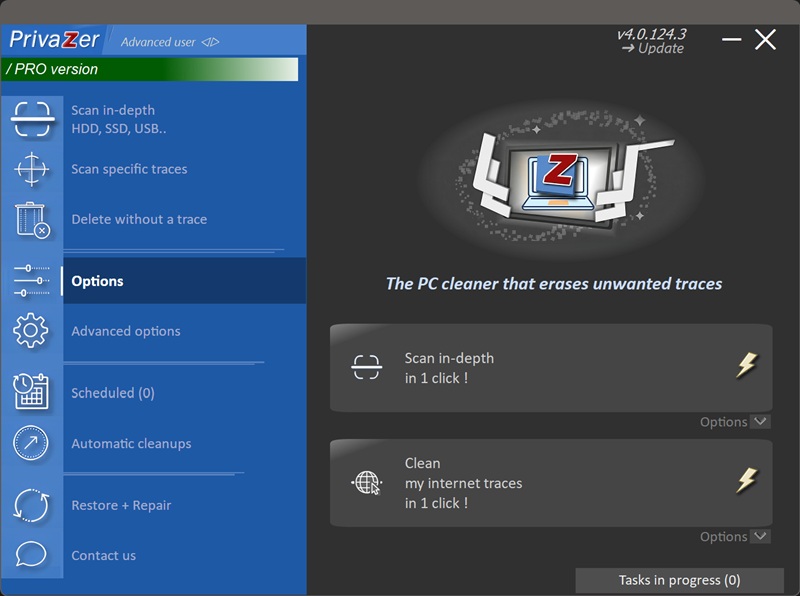
Skannealternativ - Shellbags-alternativ