PrivaZer Memory Settings Explained (Pagefile, Hibernation, Indexing)
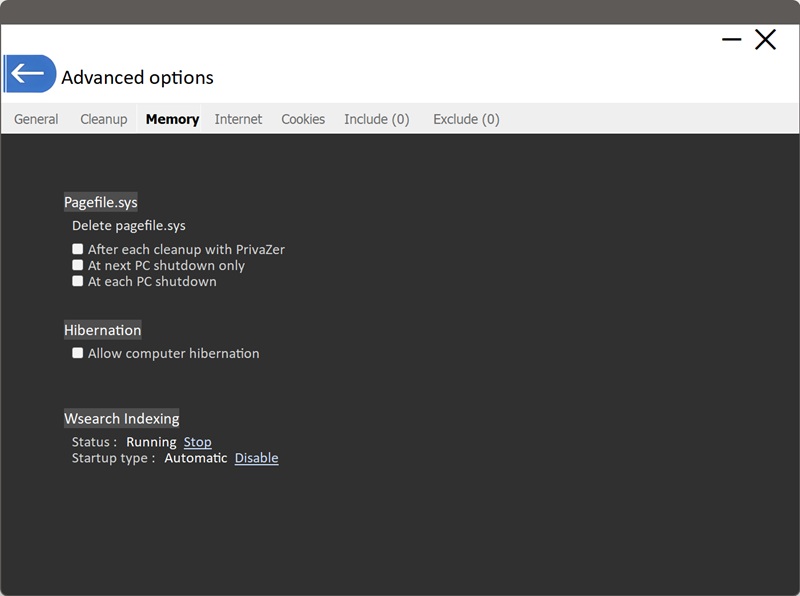
pagefile.sys is Windows' virtual memory swap file, it extends your available RAM by using space on disk. When physical memory fills up, Windows moves some of what's in RAM out to this file to make room.
Windows keeps pagefile.sys open and actively in use for as long as it's running, so it can't simply be deleted while the system is up. It can only be removed at a point where Windows itself isn't holding onto it, around shutdown and startup, which is exactly why PrivaZer offers scheduling options instead of a plain "delete now" button.
- After each cleanup with PrivaZer : schedules the deletion to happen the next time the system restarts following a PrivaZer cleaning pass
- At next PC shutdown only : a one-time deletion, the next time you shut down
- At each PC shutdown : ongoing, every single time you shut down the PC
Hibernation saves the entire contents of your RAM to a file on disk (hiberfil.sys) so the PC can power off completely and resume exactly where you left off. Since it's a full snapshot of memory, hiberfil.sys carries the same kind of sensitivity as a memory dump, potentially anything that was in RAM at that moment.
This setting controls whether hibernation is allowed to happen at all. Turning it off prevents Windows from creating or maintaining that file in the first place, rather than needing to repeatedly clean it after the fact.
Windows Search (the Wsearch service) builds and maintains a searchable index of your files and, for many file types, their actual content, so that searching your PC returns fast, relevant results. Because it indexes real file content, that index can retain fragments of what was inside a file even after the file itself has been deleted.
This section shows the service's live status and gives you direct controls: stopping it immediately, or disabling it from starting automatically the next time Windows boots.
- Stop : halts the currently running service right away. Depending on its startup type, it may start again the next time Windows boots
- Disable : changes the startup type so the service won't launch automatically at boot at all, a more lasting change until you manually re-enable it