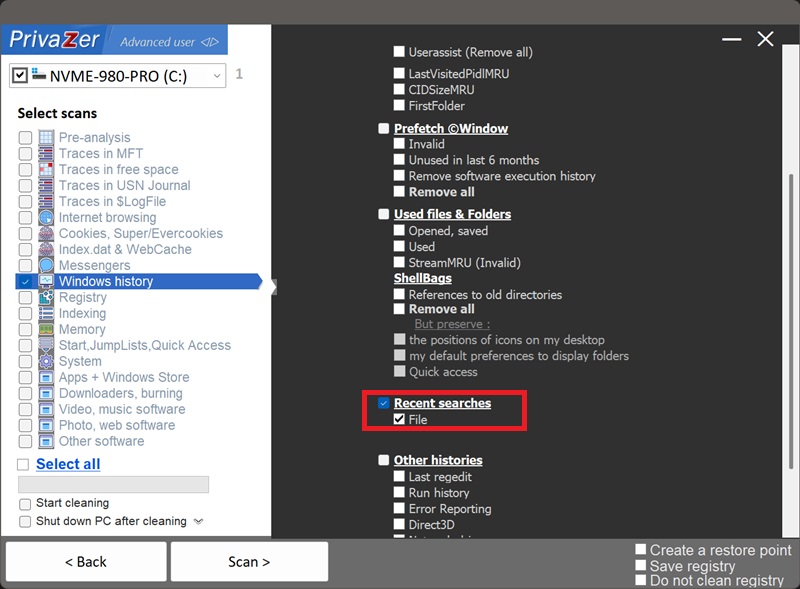
How to Clear File Explorer Search History (WordWheelQuery)?
Whenever you type something into File Explorer's built-in search box, Windows remembers it. On Windows 7, 8, 10 and 11, that history lives under HKEY_CURRENT_USER\Software\Microsoft\Windows\CurrentVersion\Explorer\WordWheelQuery.
| Field | What it reveals | Processing by PrivaZer |
|---|---|---|
| Slot number | A position in the list, not identifying on its own | Removed |
| Search text | Exactly what you typed into the search box | Removed |
| MRUListEx | Recency order of your searches | Removed |
There's no folder, no file, no application here, only the raw text of what you searched for. PrivaZer removes these entries so that search history no longer sits in the registry.
Yes. PrivaZer detects and clears the values under WordWheelQuery as part of a scan, and can target it on its own.
Like UserAssist and MUI Cache, this lives entirely under your per-user hive (HKEY_CURRENT_USER). PrivaZer simply removes the matching registry values, no reboot is needed, and no administrator rights are required since it's your own user hive.
WordWheelQuery only exists from Windows Vista onward. On Windows XP, the equivalent search history was kept by the old Search Companion, under HKEY_CURRENT_USER\Software\Microsoft\Search Assistant\ACMru\5603, specifically the box for searching files and folders by name. PrivaZer clears both keys, so your search history is covered whether it was written by the modern File Explorer search box or its XP-era predecessor.
Yes. Closing the search window, or even the app you searched from, doesn't clear the entry. Your search terms sit in the registry across reboots until the list naturally cycles old entries out, or until you clean it yourself.
Yes. Clearing it doesn't affect your files, your installed programs or system stability. The only visible effect is that File Explorer's search box stops suggesting your past searches until you search for something new.
Yes, the next search you type gets recorded again, that's normal, ongoing behavior for a search-suggestion feature. Cleaning removes the historical trail up to that point. Run PrivaZer periodically to keep it short.
Every other artifact here, shellbags, RecentDocs, the ComDlg32 keys, Amcache, UserAssist and the rest, describes something that already existed: a file, a folder, a program. WordWheelQuery describes intent, the words you chose to type. It's unstructured, so it can capture things none of the other traces would ever record.
For the file and folder side of your history, see: RecentDocs та Shellbags.
Scan options - Recent searches - File