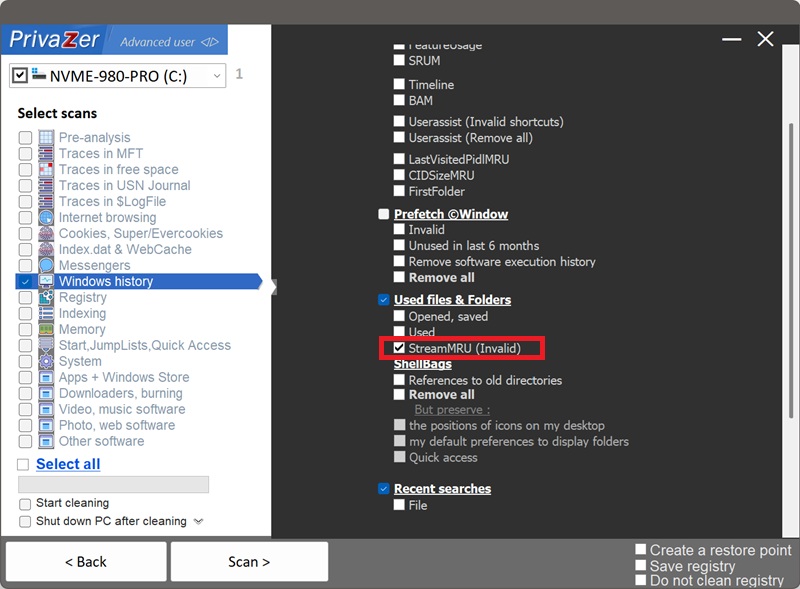
How to Clean Your Window Position History (StreamMRU)?
According to Microsoft's own documentation (KB235994), Windows saves the size and screen position of closed windows and folders, for up to 28 different windows, so they reopen the way you left them. The association between each remembered window and the actual folder or drive it pointed to is stored in the StreamMRU subkey, at HKEY_CURRENT_USER\Software\Microsoft\Windows\CurrentVersion\Explorer\StreamMRU.
| Field | What it reveals | Processing by PrivaZer |
|---|---|---|
| Entry type | What kind of location the window pointed to | Removed |
| Short & long name | The folder, drive or file's actual name | Removed |
| Size | Size of the referenced file, folder or shortcut | Removed |
| Timestamps | When it was created, modified and last accessed | Removed |
| Concatenated path & order | The full remembered location, and how recently it was closed | Removed |
Few artifacts on this site embed as much per-entry detail as StreamMRU can: a chain of named segments, each with its own dates, resolving to a full path for a window you closed possibly years ago. PrivaZer targets the entries that have gone invalid, pointing at folders, drives or shares that no longer exist, so that dangling trail no longer sits in the registry.
Yes. PrivaZer detects and clears StreamMRU entries as part of a scan, and can target them on their own. Like the ComDlg32 and shellbags keys, it lives entirely under your per-user hive (HKEY_CURRENT_USER), no administrator rights are required, and no reboot is needed for the change to take effect.
PrivaZer's option is specifically labelled "Invalid": it targets entries that no longer resolve to a real location on your PC, rather than clearing every remembered window indiscriminately.
Yes, that's the whole point of the key, it exists specifically to remember closed windows. An entry can keep describing a folder, an external drive, or a network share, complete with its name and timestamps, long after that location has been disconnected, reformatted or deleted. That's exactly what PrivaZer's invalid-entry cleanup is built to catch.
Yes. StreamMRU only stores window convenience settings, size and position, clearing it doesn't affect your files, your installed programs or system stability. The only visible effect is that a window whose entry was cleared reopens at its default size and position rather than where you last left it.
Yes, closing a window creates a fresh entry, that's normal, ongoing behavior. Cleaning only removes entries that have already gone invalid, pointing to locations that no longer exist, so windows for folders and drives you still use are left alone.
They're built the same way, chained shell-item entries resolving to a full path, and both can reference drives that are long gone. The difference is scope and detail. Shellbags record every folder Explorer has browsed to, with mostly cosmetic view settings alongside the navigation trail. StreamMRU is narrower, closed windows specifically, capped at 28, but each entry can carry richer forensic detail: size, and created, modified and last-accessed timestamps, all chained together per segment.
Scan options - Used files & Folders - StreamMRU (Invalid)