
Sådan sletter du Prefetch-filer i Windows?
Den smarte tilgang er ikke at slette hver eneste Prefetch-fil, men at behandle forskellige filer forskelligt. I PrivaZers Prefetch-indstillinger betyder det at vælge de målrettede handlinger frem for den grove:
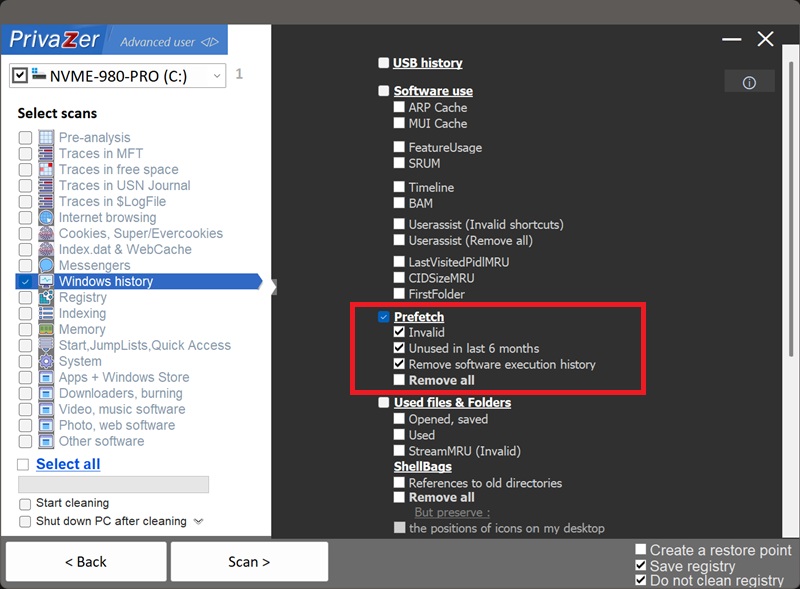
- Ugyldig, fjerner Prefetch-filer efterladt af programmer, der ikke længere er installeret. Ren ballast, sikker at slette.
- Ikke brugt i de seneste 6 måneder, fjerner forældede filer for programmer, du ikke har kørt i lang tid.
- Fjern softwareudførelseshistorik, dette er den kloge indstilling: for de programmer, du stadig bruger, neutraliserer den de private brugsdata inde i deres Prefetch-filer (datoer for senest kørt og antal opstarter), mens filerne bevares, så Windows fortsat drager fordel af dem.
- Fjern alt, sletter hele Prefetch-mappen. Vi anbefaler at lade denne være umarkeret: Windows genopbygger blot filerne, dine næste opstarter bliver langsommere, og en tom mappe er i sig selv et sikkert tegn på rensning.
Kort sagt: fjern det unødvendige (Ugyldig, Ikke brugt i de seneste 6 måneder) og neutraliser det følsomme (Fjern softwareudførelseshistorik), uden at slette det nyttige. Det er præcis det valg, der er vist ovenfor.
| .pf-filsektion | Datatype | Behandling af PrivaZer |
|---|---|---|
| Filheader | Signatur, version, exe-navn, hash | Efterladt intakt (strukturel) |
| Filoplysningsblok | Sektionsforskydninger & antal | Efterladt intakt (strukturel) |
| Senest kørt-tidspunkter | FILETIME-tidsstempler (op til 8) | Følsom (fjernet/blandet) |
| Kørselsantal | Antal gange startet | Følsom (fjernet/blandet) |
| Filmetrikker & sporkæder | Refererede sideposter | Efterladt intakt (strukturel) |
| Filnavnestrenge | Fulde stier til indlæste filer | Efterladt intakt (strukturel) |
| Volumenoplysninger | Serienummer, oprettelsestidspunkt, mapper | Efterladt intakt (strukturel) |
En Prefetch-fil er mere end en opstartsgenvej, det er en lille registrering af, hvordan du bruger hvert program. De to ravfarvede sektioner i diagrammet ovenfor er det, der gør den til en privatlivsbekymring: tidsstemplerne for senest kørt og antal opstarter afslører hvornår og hvor ofte du kørte et program. PrivaZer blander tilfældigt netop disse felter og lader de strukturelle sektioner (grå), inklusive filnavn og volumendata, forblive intakte, så Windows kan fortsætte med at bruge filen normalt.
Nej, og det er tilsigtet. Windows ville blot genopbygge dem ved næste opstart, så sletning af dem opnår intet andet end en lidt langsommere start. I stedet for at slette dem neutraliserer PrivaZer de private data, de indeholder (se nedenfor).
Ikke deres eksistens, men hvad der er indeni dem. Hver .pf-fil registrerer stille, hvornår et program senest blev kørt, og hvor mange gange det er blevet startet. Det er en tidsstemplet historik over din aktivitet, og retstekniske værktøjer læser den direkte. Selve mappen er uskadelig; de indlejrede datoer er det, der afslører.
To grunde. For det første genopbygger Windows filerne øjeblikkeligt, så "historikken" kommer straks tilbage. For det andet er en tom Prefetch-mappe unormal, det er i sig selv et synligt tegn på, at noget er blevet renset. Du ville udskifte ét spor med et andet, mere mistænkeligt et.
Du får ægte privatliv uden de tydelige tegn på rensning. Filerne forbliver på plads, mappen ser helt normal ud, Windows fortsætter med at bruge dem som tiltænkt, og alligevel er de følsomme data om senest kørt og antal opstarter væk. Ægte privatliv, ingen anomalier, intet tab af ydeevne.
Det er fristende at slå Prefetch helt fra af hensyn til privatlivets fred, men det er den forkerte afvejning, af to grunde.
For det første ville du miste en reel fordel. På moderne Windows bruges Prefetch-filerne af SysMain-tjenesten som en del af en strategi til at gøre programopstart hurtigere, selv på SSD-hardware, hovedsageligt ved at gøre det lettere at forindlæse dine ofte brugte programmer i RAM på forhånd, så opstart og boot forbliver responsive. Den gamle idé om, at Prefetch kun er nyttig på mekaniske harddiske, holder ikke længere: dens rolle har flyttet sig fra at reducere disksøgninger til at varme hukommelsen op, og den fordel gælder også for SSD'er. At slå den fra opgiver denne jævnhed uden nogen privatlivsgevinst.
For det andet opnår det end ikke privatlivsmålet: det efterlader den samme unormale tomme mappe, hvilket tiltrækker opmærksomhed i stedet for at undgå den.
PrivaZers tilgang undgår begge problemer: Prefetch fortsætter med at fungere normalt, mappen ser helt almindelig ud, og den følsomme brugshistorik inde i filerne neutraliseres. Du får privatlivet uden ulemperne.
Hurtig opsætning via menuen Indstillinger
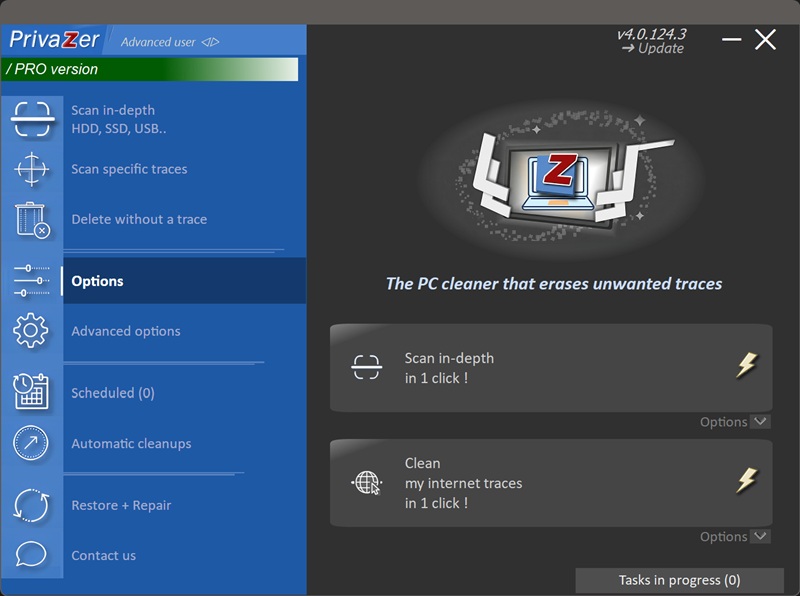
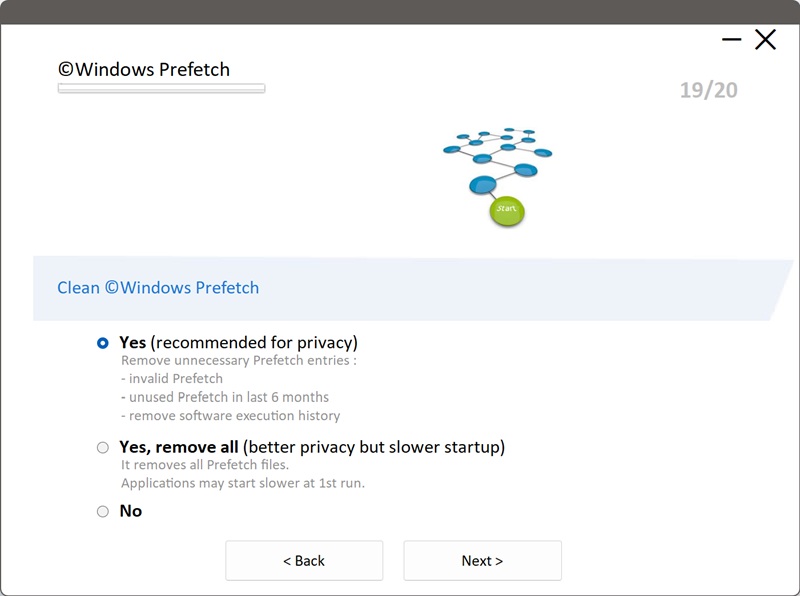
Scanningsindstillinger - Prefetch-indstillinger