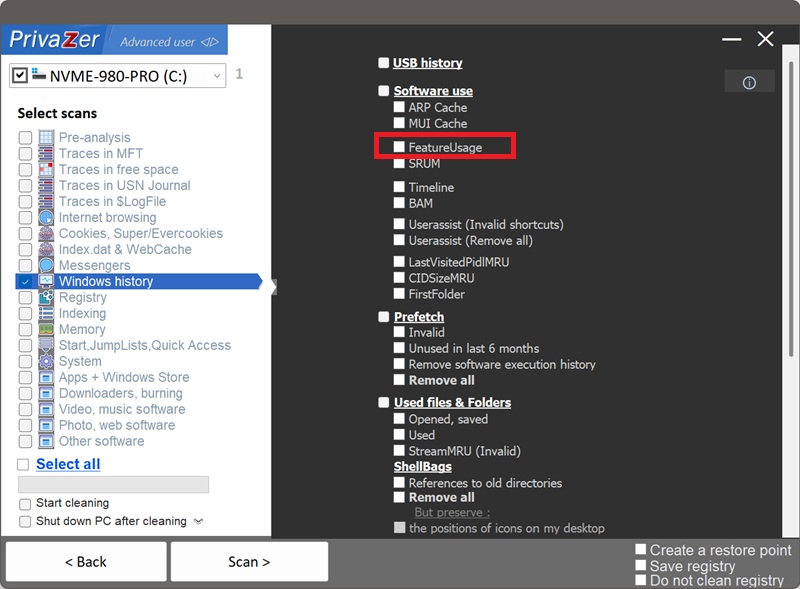
How to Clean FeatureUsage on Windows?
FeatureUsage is a Windows registry artifact that counts how you interact with the taskbar and Start Menu, not just what you launched, but how: clicking a pinned icon, switching to a window with Alt+Tab, opening a Jump List, clicking a tray button. It lives under HKEY_CURRENT_USER\Software\Microsoft\Windows\CurrentVersion\Explorer\FeatureUsage.
It's lighter than UserAssist, no timestamps, just running counters, but it's also easy to overlook: several independent subkeys quietly tally how often each app was pinned-launched, switched to, or had its Jump List opened. Cleaning it removes those usage counts.
| Subkey | What it reveals | Processing by PrivaZer |
|---|---|---|
| AppLaunch | How often you launched an app from a pinned icon | Removed |
| AppSwitched | How often you switched to that app's window | Removed |
| ShowJumpView | How often you opened its Jump List | Removed |
| TrayButtonClicked | How often a tray icon or button was used | Removed |
There are no timestamps here, just running counts, so on its own FeatureUsage can't say when something happened, only how often. That's still meaningful: high counts point to habitual, everyday use rather than a one-off, which is exactly the kind of usage pattern other traces don't capture. PrivaZer clears these counters so that usage-intensity picture no longer sits in the registry.
Yes. PrivaZer detects and clears the FeatureUsage counters as part of a scan, and can target them on their own.
Like UserAssist and MUI Cache, FeatureUsage lives entirely under your per-user hive (HKEY_CURRENT_USER), not a locked machine-wide hive and not a cache flushed at shutdown. PrivaZer simply removes the matching registry values, no reboot is needed for the change to take effect, and no administrator rights are required since it's your own user hive.
Yes. Uninstalling a program does not remove its FeatureUsage counters. How many times it was pinned-launched, switched to, or had its Jump List opened can stay behind, showing a pattern of regular use, even after every trace of the program itself is gone. Cleaning FeatureUsage is what removes that leftover record.
Yes. FeatureUsage is a set of internal counters Windows keeps for its own bookkeeping, clearing them does not affect your installed programs, your taskbar pins, or system stability. Windows simply starts counting again from zero as you keep using the taskbar and Start Menu.
Yes, and that's normal. Every pinned-icon launch, Alt+Tab switch or Jump List view starts a fresh count. Cleaning removes the historical tally up to that point. Run PrivaZer periodically to keep it short.
All six show that software existed or was used on your PC, but each catches a different slice. FeatureUsage is the only one built entirely from simple interaction counters, no timestamps, no hash, no path in most cases, just how many times you launched, switched to, or opened the Jump List of an app. UserAssist logs GUI launches with a run count and last-used date. MUI Cache stores the program's real name. Amcache is a hive file with a SHA-1 hash. Shimcache logs paths and last-modified dates. SRUM tracks hourly CPU, network and energy use. Cleaning only one leaves the other five intact.
For the others, see: Amcache, Shimcache, UserAssist, SRUM 和 MUI Cache.
Scan options - FeatureUsage option