How to Clear Typed Paths in File Explorer (TypedPaths)?
TypedPaths tracks the last 25 paths typed directly into File Explorer's address bar, rather than reached by clicking through folders. It's stored per user at HKEY_CURRENT_USER\Software\Microsoft\Windows\CurrentVersion\Explorer\TypedPaths.
Unlike RunMRU or Map Network Drive MRU, there's no separate order-tracking value here, the url1, url2 numbering itself carries the recency, with url1 always the most recent. The path can be local (C:\troller) or remote, a UNC path to an SMB share, or a URL, so it can reveal installed application locations, network shares, DNS suffixes or IP addresses, and more, depending on what was typed.
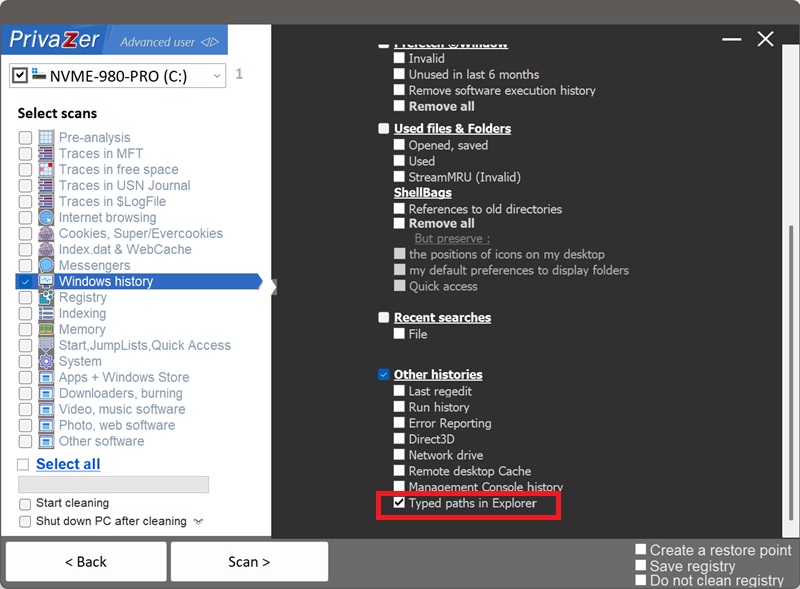
Yes. PrivaZer detects and clears all the values under TypedPaths as part of a scan, and can target it on its own. Like RunMRU and Map Network Drive MRU, this lives entirely under your per-user hive (HKEY_CURRENT_USER), no administrator rights are required, and no reboot is needed.
Yes. If the folder is deleted, the drive is disconnected, or the network share goes offline, the entry stays in your history regardless. It can keep naming a location that no longer exists anywhere, until it's cycled out by newer entries or removed by cleaning.
Yes. Clearing it doesn't affect your files, your installed programs or system stability. The only visible effect is that File Explorer's address bar stops suggesting paths you've typed before, you'll need to type them out again, or they'll build back up as you use the address bar.
Yes, the next path you type and the window you typed it in gets closed, a new entry is committed. That's expected, ongoing behavior. Run PrivaZer periodically to keep the list short.
All three store plain-text paths under Explorer with no binary decoding needed, but each has its own naming convention and trigger. RunMRU 그리고 Map Network Drive MRU use lettered values (a, b, c) with a separate MRUList, and commit as soon as the command runs or the drive is mapped. TypedPaths uses url1, url2 numbering with no separate order value, and only commits when you close the Explorer window. Same family, different bookkeeping.
Scan options - Other histories - Typed paths in Explorer