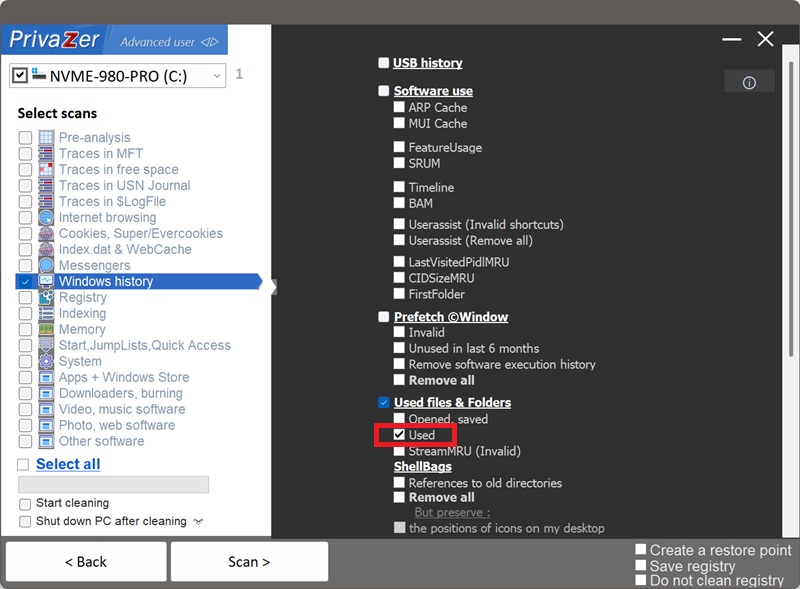
Sådan renser du senest anvendte dokumenter (RecentDocs)?
RecentDocs er nok det bedst kendte "seneste filer"-artefakt i Windows, det er den registreringsnøgle, der ligger bag Stifinders egen liste over seneste filer under Hurtig adgang og "Åbn seneste"-menuen, du ser i mange programmer. I modsætning til ComDlg32-familien, som kun registrerer filer, der tilgås via et programs egen Åbn/Gem-dialogboks, registrerer RecentDocs ethvert dokument, du åbner via Stifinder eller en shell-association, dokumenter, billeder, præsentationer, genveje og mere. Den findes under HKEY_CURRENT_USER\Software\Microsoft\Windows\CurrentVersion\Explorer\RecentDocs.
| Felt | Hvad det afslører | Behandling af PrivaZer |
|---|---|---|
| Hovedliste over filer | Hvert dokument, du senest har åbnet | Fjernet |
| Undernøgler for filtype | En hurtig gennemgang af hver fil, du har åbnet, efter type | Fjernet |
| Folder-undernøgle | Hvor filer blev åbnet fra | Fjernet |
| MRUListEx | Den rækkefølge filer blev tilgået i | Fjernet |
| Genvejsfiler | Den samme liste, synlig direkte som filer | Fjernet |
Undernøglerne for filtype betyder, at den samme fil vises mere end én gang, én gang i hovedlisten, én gang under sin egen filtype, så det alene at gennemse .pdf-undernøglen giver en undersøger en færdiglavet liste over hver PDF, du har åbnet, uden at skulle sortere i andet. PrivaZer fjerner både registreringsværdierne og undernøglerne og rydder de tilsvarende genvejsfiler, så intet af denne historik efterlades noget sted.
Ja, og det er en af de mere omfattende rensninger på dette site, fordi den spænder over både filsystemet og registreringsdatabasen:
- Den fjerner genvejsfilerne fra %APPDATA%\Microsoft\Windows\Recent, og springer over desktop.ini.
- Den gør det samme for %USERPROFILE%\Recent, den linkede sti til samme mappe, som en anden gennemgang.
- Den fjerner både værdierne og undernøglerne under HKCU\...\Explorer\RecentDocs, hvilket dækker undernøglerne for filtype og Folder samt hovedlisten.
Ingen administratorrettigheder er påkrævet, dette er udelukkende brugerspecifikke data, og ingen genstart er nødvendig.
Ja. Sletning af det oprindelige dokument fjerner ikke dets RecentDocs-post eller dets genvejsfil i mappen Seneste. Begge kan fortsætte med at navngive en fil, og den mappe den kom fra, længe efter at filen selv, og endda det drev den lå på, er væk. Rensning af RecentDocs er det, der fjerner denne rest.
Ja. At rydde det rører ikke dine faktiske dokumenter, dine installerede programmer eller systemets stabilitet. Den synlige effekt er, at seneste filer under Hurtig adgang og "Åbn seneste"-menuer i dine programmer bliver tomme igen, indtil du åbner filer igen. Som nævnt ovenfor efterlades dine Jump Lists specifikt uberørte af denne rensning.
Ja, det næste dokument du åbner via Stifinder eller et program, registreres igen, både i registreringsdatabasen og som en ny genvejsfil. Det er forventet, RecentDocs er en løbende bekvemmelighedsfunktion. Kør PrivaZer jævnligt for at holde sporet kort.
ComDlg32-familien, LastVisitedPidlMRU, CIDSizeMRU, FirstFolder og OpenSaveMRU, registrerer kun aktivitet inde i et programs egen fælles Åbn/Gem-dialogboks. RecentDocs spænder bredere: den registrerer ethvert dokument, der åbnes via Stifinder eller en shell-filassociation, uanset om en dialogboks nogensinde var involveret. Den er også den eneste af de to familier, der er bakket op af egentlige genvejsfiler, du kan se direkte i en mappe, ikke kun registreringsposter.
Se også: OpenSaveMRU, LastVisitedPidlMRU, CIDSizeMRU og FirstFolder.
Scanningsindstillinger - Brugte filer & mapper - Brugt