How to Clear the DNS Cache on Windows?
Every time your PC needs to reach a domain name, opening a website, an app checking for updates, a background service phoning home, Windows first has to translate that name into an IP address. The DNS Client service keeps a local cache of these lookups so it doesn't have to ask a DNS server again for names it has already resolved.
| Field | What it reveals | Processing by PrivaZer |
|---|---|---|
| Record name | Which domain was contacted | Removed |
| Record type | What kind of address was returned | Removed |
| TTL | Roughly how recently it was cached | Removed |
| Resolved IP | The server this PC was directed to | Removed |
You can see this for yourself with Get-DnsClientCache in PowerShell (or the older ipconfig /displaydns), which lists every currently cached name alongside its type, TTL and resolved address, exactly the fields PrivaZer clears.
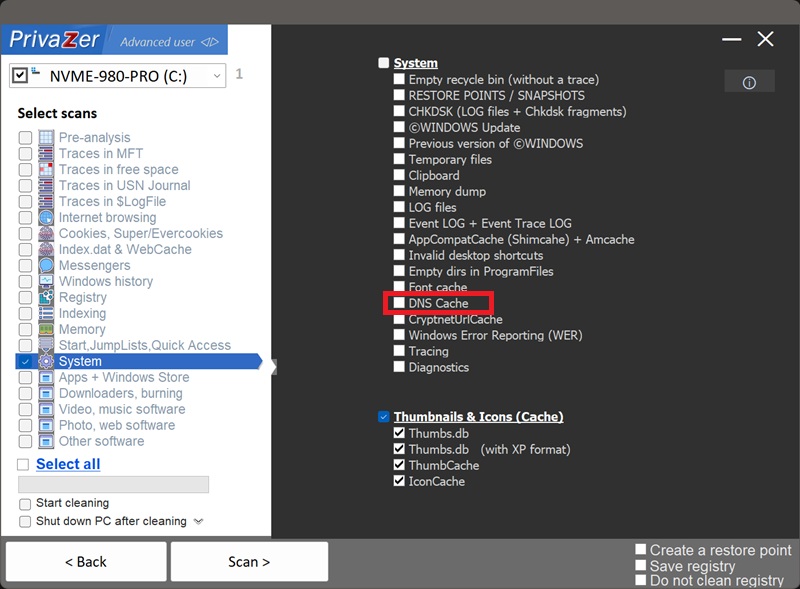
Yes. PrivaZer flushes the DNS resolver cache, the same effect as running ipconfig /flushdns from the command line. This is a different kind of action from most traces on this site: rather than deleting a file or a registry value, it clears an in-memory cache that Windows itself maintains. It's immediate and doesn't require a reboot.
Yes. Since it's maintained by Windows itself rather than any individual app, closing your browser, or any other program, has no effect on it. It does clear itself automatically on every reboot, since it's held entirely in memory, but it can otherwise persist for as long as your PC stays running, sometimes days or weeks.
Yes. This is purely a performance cache, clearing it doesn't affect your internet connection or any app's ability to reach the internet. The only effect is that the next time you visit a site or reach a service you'd recently used, Windows has to look up its address again, adding a barely noticeable delay before the cache rebuilds.
Yes, immediately, the next domain your PC needs to reach gets looked up and cached again. That's normal, expected behavior for a performance feature built into every DNS resolver. Run PrivaZer periodically if you'd rather it stay cleared.
Both are memory-only network caches maintained by Windows and both clear automatically on reboot, but they map different things. The ARP Cache maps IP addresses to MAC addresses for devices on your local network, who else is on your Wi-Fi or LAN. The DNS Cache maps domain names anywhere on the internet to IP addresses, which sites and services this PC has reached. Domain names are usually far more self-explanatory than a MAC address, which is part of why this cache tends to be more directly revealing.
Scan options - System - Cache DNS