How to Clear the CryptnetUrlCache (Certificate Validation Cache)?
Whenever Windows checks whether a digital certificate is still valid, for example while verifying a signed program before it runs, or downloading an intermediate certificate needed to complete a trust chain, it caches the downloaded data locally so it doesn't have to re-fetch it every time. That cache is CryptnetUrlCache, and it's kept in three locations:
- C:\Windows\System32\config\systemprofile\AppData\LocalLow\Microsoft\CryptnetUrlCache (SYSTEM account, 64-bit)
- C:\Windows\SysWOW64\config\systemprofile\AppData\LocalLow\Microsoft\CryptnetUrlCache (SYSTEM account, 32-bit)
- C:\Users\<username>\AppData\LocalLow\Microsoft\CryptnetUrlCache (your account)
| Field | What it reveals | Processing by PrivaZer |
|---|---|---|
| Timestamp | When a certificate check happened | Removed |
| URL | Which certificate authority or revocation server was contacted | Removed |
| FileSize | Size of the cached revocation or certificate data | Removed |
| MetadataHash | A fingerprint that can identify the exact cached file | Removed |
| FullPath | Where the cached data was stored locally | Removed |
Put together, these fields can indirectly show which signed software or secure services this PC has validated certificates for, and roughly when, purely as a side effect of Windows doing its normal trust-checking job.
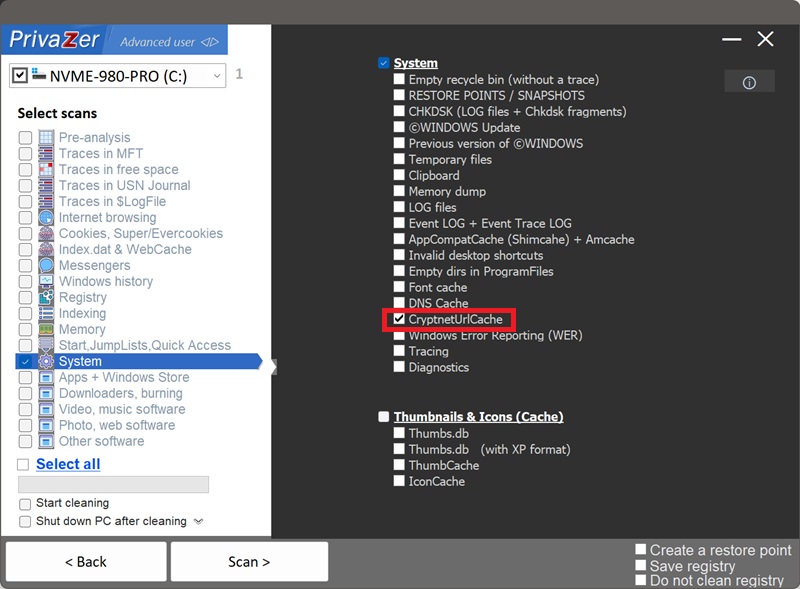
Yes, CryptnetUrlCache appears as its own option under the System category in PrivaZer's scan options, alongside other system-level caches like the Font cache and DNS Cache. It's designed to clear the cache content across the account locations covered above. As with any cache actively used by Windows' certificate-checking, we'd recommend closing other running programs first, so PrivaZer has a clean shot at clearing it fully.
Yes. The cached revocation data and its metadata are tied to the certificate and the validation event, not to the program that triggered it. Uninstalling the software doesn't remove the record that its certificate was checked, or when.
Yes. This is purely a performance cache, clearing it doesn't weaken your security in any way. Windows will simply re-fetch revocation and certificate data the next time it's genuinely needed, which may add a brief, one-time delay to that specific check, the same as clearing any other cache.
Yes, it rebuilds automatically and silently as Windows continues validating certificates in the background, that's expected. Run PrivaZer periodically if you'd rather it stay cleared.
A browser cache stores things you deliberately browsed to. Windows Error Reporting records specific crash events. CryptnetUrlCache is neither, it's an incidental trace of automatic, background trust verification, closer in spirit to Amcache or Shimcache in that it's a byproduct of programs running, but reached through certificate validation rather than execution tracking directly.
Scan options - System - CryptnetUrlCache