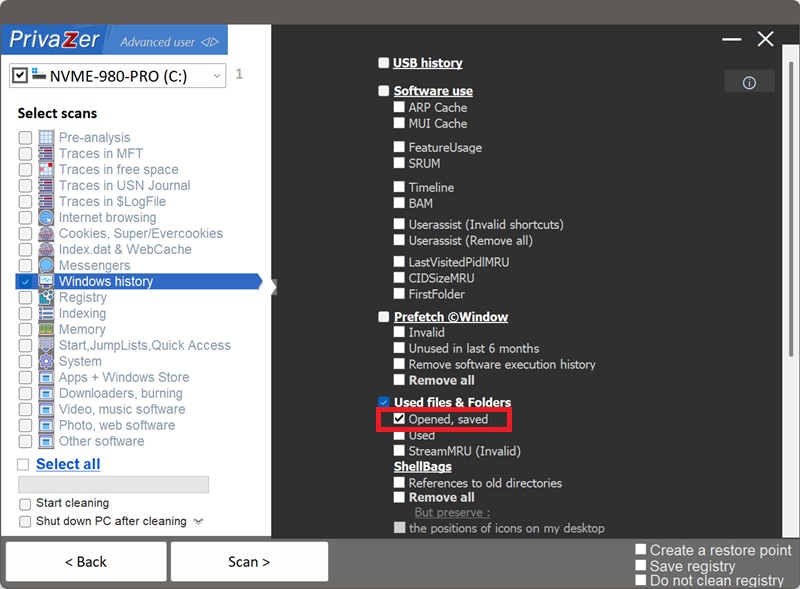
How to Clean Recently Opened and Saved Files (OpenSaveMRU)?
OpenSaveMRU tracks files accessed through the "Open" or "Save As" common dialog box, and it's the richest member of the ComDlg32 family covered on this site. There are two versions depending on your Windows release:
- HKCU\Software\Microsoft\Windows\CurrentVersion\Explorer\ComDlg32\OpenSaveMRU on Windows XP and earlier.
- HKCU\Software\Microsoft\Windows\CurrentVersion\Explorer\ComDlg32\OpenSavePidlMRU on Windows Vista and later.
| Field | What it reveals | Processing by PrivaZer |
|---|---|---|
| File extension subkey | Which type of files were accessed | Removed |
| File name | The real name of the document | Removed |
| Full file path | Exactly where the file was stored | Removed |
| MRU order & timestamps | When and in what order files were used | Removed |
| Associated application | Which program was used | Removed |
Because entries are grouped by extension, anyone reading this key can browse straight to "every .docx you've opened" or "every .jpg you've saved" without sifting through anything else. PrivaZer clears both the subkeys and the values underneath OpenSaveMRU (or OpenSavePidlMRU, whichever your Windows version uses) so that list no longer sits in the registry.
Yes. PrivaZer first determines which key applies to your version of Windows, OpenSavePidlMRU or the older OpenSaveMRU, then removes both the extension subkeys and the values directly under the main key, since the file-name data can live in either place depending on the entry. It can target this on its own or as part of a full scan.
Like its ComDlg32 siblings, this lives entirely under your per-user hive (HKEY_CURRENT_USER). No lock to work around, no reboot needed, and no administrator rights required since it's your own user hive.
Yes, either way. Deleting the file doesn't remove its entry, and uninstalling the program you used to open or save it doesn't either. The file name, its full path and the timestamp of when you accessed it can all stay in the registry indefinitely, describing a document that may no longer exist anywhere on your PC. Cleaning OpenSaveMRU is what removes that leftover.
Yes. Clearing it doesn't touch your actual files, your installed programs or system stability. The only visible effect is that Open/Save dialogs stop suggesting recently used files until you build up a new history by using them again.
Yes, the next file you open or save through a common dialog gets recorded again, that's expected. Cleaning removes the historical trail up to that point. Run PrivaZer periodically to keep it short.
All four live under ComDlg32, but they answer different questions. LastVisitedPidlMRU says which folder an app's dialog was last pointed to. FirstFolder says where that started. CIDSizeMRU keeps an MRU list of identifying strings. OpenSaveMRU is the only one that names the actual files, organized by type, with full paths and timestamps. If you only have time to clean one ComDlg32 key, this is the one that matters most.
See also: LastVisitedPidlMRU, CIDSizeMRU a FirstFolder.
Scan options - Used files & Folders - Opened, saved