How to Clear the RDP Bitmap Cache (Remote Desktop Screenshots)?
When you connect to another computer with Remote Desktop (mstsc.exe), the client caches parts of the remote screen locally, the portions that haven't changed since the last refresh, so it doesn't need to redraw everything over the network each time. That cache is stored per user, at %LOCALAPPDATA%\Microsoft\Terminal Server Client\Cache, and it stays on disk even after the session is closed.
| Field | What it reveals | Processing by PrivaZer |
|---|---|---|
| Bitmap tiles | Actual visual fragments of the remote screen | Removed |
| Tile metadata | How to interpret and reassemble each tile | Removed |
| Index (.bmc) files | Which tiles belong together | Removed |
| Cache (.bin) files | The bulk of the cached image data, per session | Removed |
| Timestamps | Roughly when a given session took place | Removed |
On its own, one tile is meaningless, a small grid of pixels. Stitched together with the rest of the cache, they can form a recognizable image of what was on the remote screen, potentially including anything that was visible during that session. PrivaZer clears the entire cache directory so there's nothing left to stitch.
Yes. PrivaZer removes the entire Terminal Server Client\Cache folder for your account, covering both the index files and the cache data files in one pass. It's per-user data under your own AppData folder, so no administrator rights are required, and no reboot is needed.
Yes, and that's explicitly by design, the cache is meant to persist so future sessions to the same server can benefit from it. Closing Remote Desktop, disconnecting, or even the remote server going offline doesn't clear these files. They can sit on disk indefinitely until reused, overwritten, or cleaned.
Yes. Clearing it doesn't affect your files, your installed programs or system stability, and it has no effect on the remote computer at all, only the local cache. The only visible effect is that your next Remote Desktop session to a given server may redraw slightly more data over the network at first, since it can't reuse the old cached tiles, until a fresh cache builds up.
Yes, your next Remote Desktop session starts building a fresh cache right away, that's normal, expected behavior for a performance feature. Run PrivaZer periodically, or after any sensitive remote session, to keep it cleared.
Windows Timeline can name a document you opened. OpenSaveMRU can name a file you saved. Amcache can name a program you ran. None of them show you what any of it looked like. The RDP bitmap cache is the one artifact on this site that stores actual visual content rather than a description of an event, which is exactly why dedicated reconstruction tools exist for it and not for the others.
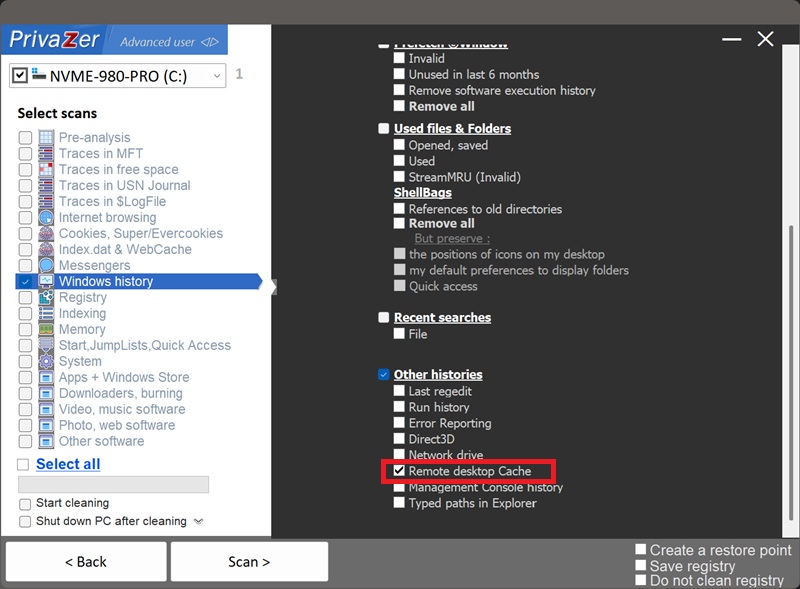
Scan options - Other histories - Remote desktop Cache