
Download Support  Company Press


Free PC cleaner & Privacy tool
It cleans and removes unwanted traces of your past activities.
See exactly what can still be recovered
of your past activities on your PC at home, at work
In-depth cleanup of unwanted traces of what you've done
watched, downloaded, deleted, etc.
PrivaZer prevents recovery of your activities.
Master your security & freedom
Free up disk space. Keep your PC fit and secure !!!
Secure cleanup
with one click
In-depth cleanup
of your PC and storage devices
Privacy protection


Free PC cleaner
that cleans unwanted traces.


Do you know what is still there
in your free space ?


Do you know what is still there
of your past activities ?


Help us to improve PrivaZer !

Click here to post your idea


So many traces ! That's not surprising.


When you use your PC (at home or working at your office), go on Internet, watch a video, download, copy/remove files on your PC, install/uninstall or use software, etc
you always leave sensitive traces which :


- makes your PC slower and cluttered
- reduces free space available and
- puts you at risk for a bad consequence :
  what you have done could be easily recovered
  by analyzing your PC
  with an expert recovery software
  or with more advanced techniques.

Then, we decided to develop a new type of cleaning tool
to give you the peace of mind that once your data is gone,
it is gone for good.
See innovations included in PrivaZer below.


We believe that PrivaZer should be accessible to all
to preserve freedom and security.
That's the reason why PrivaZer is a free PC cleaner.


How to test PrivaZer ?

See performance tests
 

TEST NO. 1
Smart cleanup of free space

. Scan and clean traces in free space with PrivaZer
. Note elapsed time in the cleanup window
. Do step 1 again and compare elapsed times

You should notice that 2nd cleanup is much faster than 1st one.

Comment : smart cleanup of free space is available for all FAT and NTFS formatted drives
and for C:\ drives if formatted as NTFS (which is generally the case)

Click here to see tutorial & test result no. 1
Click here to see tutorial & test result no. 2


TEST NO. 2

Detection of residual traces in free space

. Download free version of sdelete from Microsoft website : here
. Reset to zero free space with sdelete (use option -z to zero current drive free space)
. Scan traces in free space with PrivaZer

PrivaZer should detect no trace in the free space.

Comment : a minimum level of traces will always be detected on your C:\ drive.
Your system is running so that it continuously creates, moves, deletes temporary files.

So you'd better perform the test on a second internal or external drive.


Click here to see tutorial & test result no. 1
Click here to see tutorial & test result no. 2


TEST NO. 3
Detection of residual traces in free space

. Clean file table (FAT or MFT) with PrivaZer
. Download free version of sdelete from Microsoft website : here
. Reset to zero free space with sdelete (use option -z to zero current drive free space)
. Copy a file of about 100 MB or more in size
. Delete the file
. Empty recycle bin (to be sure the file is really deleted)

. Scan traces in free space with PrivaZer

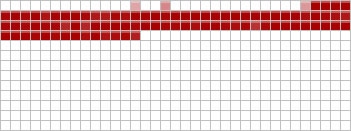
PrivaZer should detect residual traces left by the file
- in the free space (red color) and
- in the file table (FAT or MFT)


Click here to see tutorial & test result no. 1
Click here to see tutorial & test result no. 2


TEST NO. 4
File recovery prevention

. Download free version of recovery software like GetDataback : here or Recuva : here
. If you intend to use GetDataback, be sure to have checked "Recover deleted files" in "Options"
. Scan recoverable files with it
. Clean with PrivaZer traces in free space + traces in MFT or FAT
. Scan again recoverable files with the recovery software

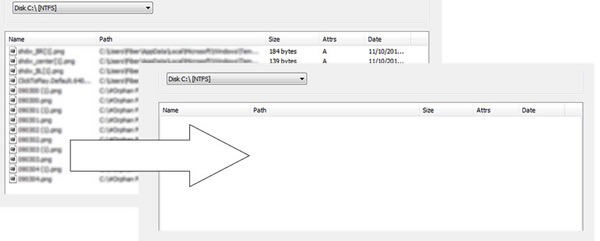
The recovery software should no longer detect recoverable files.

Click here to see tutorial & test result no. 1
Click here to see tutorial & test result no. 2


Learn more

10 Innovative solutions in data security
 

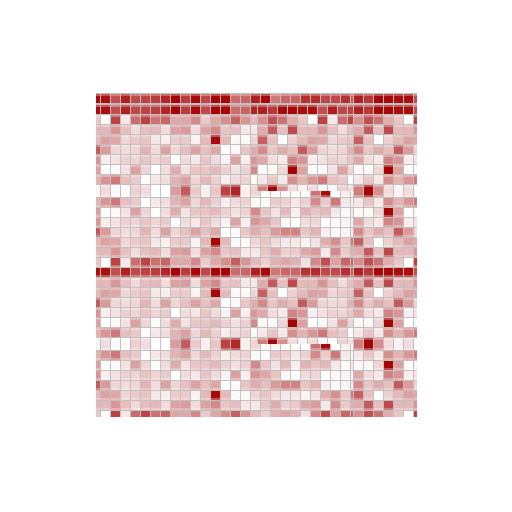
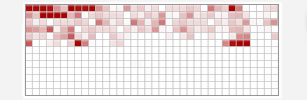
1- Detection of residual traces in free space
  Visualization of residual traces of old files remaining in free space


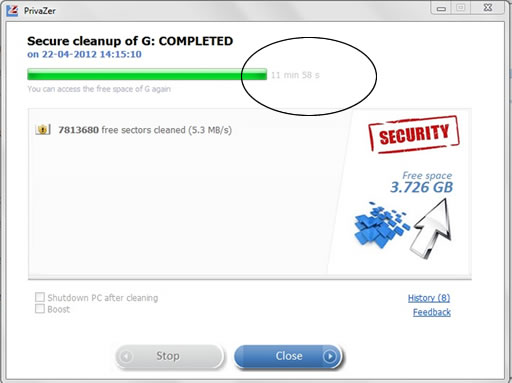
2- Smart cleanup of free space
  Cleanup of residual traces in free space areas needing a reset to zero
  We assure no useless cleanups.
  Areas already reset to zero are not cleaned which can speed up cleanup by 2x to 100x.
  Cleanup runs faster after each run.

3- File table cleanup
  Cleanup of residual traces in file tables, not only in MFT but in FAT as well
  Additional cleanup of INDEX attributes in MFT

4- Smart overwriting
  Recognition of type of storage medium of your storage device : magnetic disk, SSD, etc
  Adaptation of overwriting algorithms to storage medium

5- Smart cleanup of Jumplists
  Cleanup of your Jumplists without deleting your pinned items/ websites which are preserved

6- Smart cleanup of Prefetch
  Removing of invalid Prefetch entries. Old valid entries are preserved.

7- Deletion of USB history
  Deletion of remaining traces of disconnected device (name, date, etc)

8- Scan and cleanup of Pagefile.sys / Hiberfil.sys content
  Visualization of Pagefile.sys / Hiberfil.sys content


  Pagefile.sys cleanup options : at each PC shutdown, or at next shutdown only
  Control of Hiberfil.sys cleanup : PrivaZer controls that the system has reset to zero Hiberfil.sys.
 If not, PrivaZer overwrites Hiberfil.sys sectors with zeros.
  

9- Scan of thumbnails
  Full scan of the drive to retrieve remaining thumbs.db files and show their content
  Visualization of ThumbCache files content
  
10- Scan of residual traces in Indexing service
 Scan of remaining traces of deleted files still indexed by Windows™ Indexing Service


10 Major functionalities  

1- FIND AND DISPLAY
   » PrivaZer scans your system and your external storage devices as well
   » PrivaZer shows you its findings in easy-to-follow visualizations


2- CLEAN AND PROTECT
   » Irreversible cleanups by overwriting techniques
   » Smart overwriting : PrivaZer automatically recognizes your storage device type and
  adapts its overwriting algorithms to the storage medium (magnetic disk, SSD, etc)
   » Your personal documents are preserved

   » You can control existence of remaining sensitive traces after cleanup


3- PROTECTION AGAINST RECOVERY
   » Your old deleted files can still be recovered with an expert recovery software.
  PrivaZer performs a cleanup of residual traces in file table (FAT or MFT) and free space
  to avoid any possibilities of recovery


» No recovery possible with expert software like :
  
. GetDataback
  
. Testdisk
  
. O&O DiskRecovery
  
. Recuva
  
. Glary Undelete
  
. Easeus Data Recovery
  
. Pandora Recovery
  
. Paragon Backup & Recovery
  
. Ontrack EasyRecovery
  
. Recover My Files
  
. Stellar Phoenix Data Recovery


No recoverable files after cleanup


4- VIEWERS INCLUDED in PrivaZer
   » Disk usage Viewer
   » Index.dat content Viewer

   » Pagefile.sys content Viewer
   » Hiberfil.sys content Viewer
   » Jumplists Viewer
   » Thumbcache, Thumbs.db content Viewer


5- SMART CLEANUP of FREE SPACE
   » Optimized cleanup of residual traces remaining in storage free space

   » Areas already reset to zero are not cleaned which can speed up cleanups by 2x to 100x.
   » Don't wait for hours...

   » Cleanup runs faster after each run.
   » We assure no useless cleanups.

Before After

 SMART CLEANUP


6-
SMART CLEANUP of COOKIES
   » PrivaZer helps you choose cookies to delete
   » Cookies of your favorite sites are preserved
  so that you do not need to retype your login/password again and again


7- SMART CLEANUP of JUMPLISTS
   » Cleans useless histories of opened files, visited websites, etc appearing in Jumplists
   » Your pinned items are preserved
   » Your pinned websites are preserved


8- SMART CLEANUP of PREFETCH
   » PrivaZer performs a smart cleanup of Windows Prefetch
   » Prefetch is useful for your system and should not be removed completely

   » PrivaZer takes care of your Prefetch by removing invalid Prefetch entries


9- SHREDDER
   » Definitive and irreversible deletion of files or directories of your choice


10- OTHER KEY FEATURES
   » Scheduling of cleanups
   » Live measurement of free space gain
   » PrivaZer priority execution management

   » Indexing management
   » Hibernation management


   » Registry cleanup

   » Registry restore
   » System restore


More than 100 scans / cleanups
 

With simply one click, PrivaZer is able to clean securely

. Internet browsers
. Index.dat
. Cookies
. Cookies Tor
. Cookies Flash
. Cookies Silverlight
. DOM Storage
. IndexedDB
. AppCache


. Registry
. RAM

. Pagefile.sys and Hiberfil.sys files

. Use of software
. Messengers
. Histories of visited websites, viewed videos, use of software, opened docs, etc
. Jumplists

. Recycle bin
. Temp files
. Log files

. Invalid Prefetch entries
. Indexing service
. ThumbCaches, Thumbs.db


. Residual traces of deleted files
. Free space
. File table (MFT or FAT)
. INDEX attributes in MFT

. USN Journal, etc


Definitive deletions of files
 

PrivaZer offers you the ability to permanently delete infividual files or directories
of your choice to prevent full or partial recovery of them.
Need to delete a specific or directory, but want some assurance that it is truly gone for good?
PrivaZer has got you covered with individual file and directory deletions that permanently and irretrievably erase data that the world doesn’t need to know about.


2012-2013 ©Copyright Goversoft LLC -
Contact us.