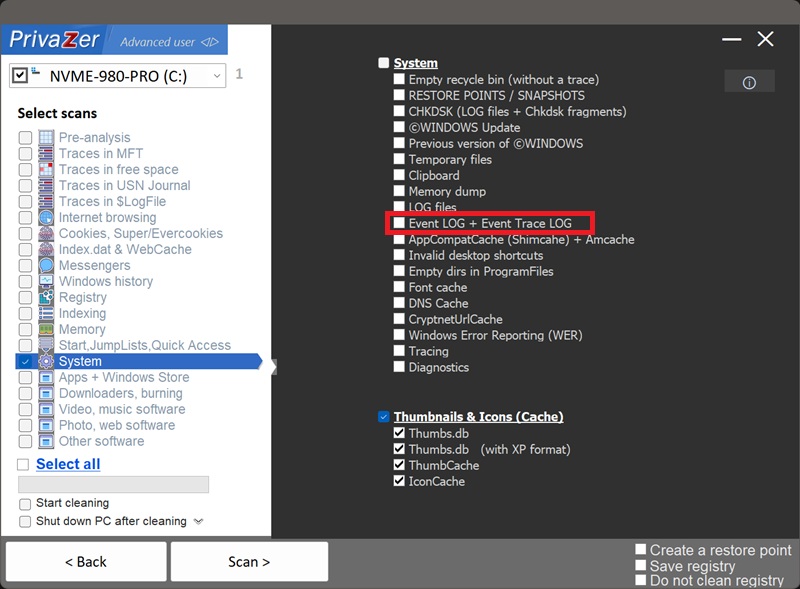
How to Clear Windows Event Logs (EVTX) and Event Trace Logs (ETL)?
EVTX is the file format Windows has used for its event logs since Vista and Server 2008, replacing the older EVT format. These files live at C:\Windows\System32\winevt\Logs, and they record a genuinely comprehensive audit trail of what happens on the system: logons, process creation, privilege use, credential access, and configuration changes, among many other event types.
Each log channel gets its own file: Security.evtx (the security audit log), System.evtx (operating system events), Application.evtx (application events), plus custom channels that specific tools create for themselves (Sysmon, PowerShell operational logging, Windows Update, and more).
Internally, an EVTX file is organized as a series of chunks, each holding a header and a set of event records. Each record is essentially XML rendered through a binary template, with the specific values (account names, process names, IP addresses, and so on, depending on the event) substituted in. Investigators reading these files in Event Viewer, or in dedicated forensic tools that map thousands of documented event IDs, see the fully rendered version.
.etl files are produced by Event Tracing for Windows (ETW), a lower-level, high-performance tracing framework that many of Windows' own diagnostic and logging features are built on top of, including some of what eventually surfaces in EVTX channels. Unlike EVTX, which lives in one central folder, .etl files show up scattered across several different directories depending on which component created them.
PrivaZer clears both together: the EVTX event logs in their central location, and the .etl trace files across the various directories where Windows and its components leave them.
Yes. PrivaZer removes .evtx files from C:\Windows\System32\winevt\Logs, along with .etl trace files from their various locations.
Yes, that's the whole point of a log, an entry for a logon, a process launch or a configuration change stays recorded long after the moment itself has passed, until the log file rolls over, is archived, or is cleared.
Clearing event logs doesn't affect your files, your installed programs or system stability, Windows immediately starts logging fresh events again. The trade-off worth knowing: you're also clearing your own historical record, useful if you're troubleshooting a recurring issue, or if Windows' own diagnostics rely on recent log history. If you're actively investigating a problem on your PC, it can be worth waiting until it's resolved before clearing these logs.
Yes, immediately and continuously. Windows logs events as an ongoing part of how it runs, so fresh entries start appearing right away, that's expected. Run PrivaZer periodically if you'd rather keep the history short.
Scan options - System - Event LOG + Event Trace LOG